
This document introduces the parameters, functions, and operation instructions of the digital display temperature controller (electronic refrigerator) ED230, as well as installation and usage precautions and accessories.
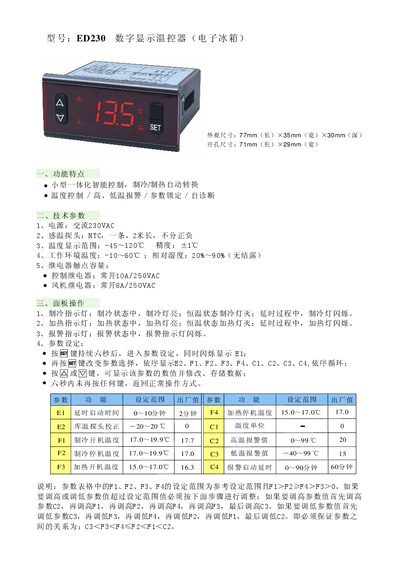
This manual describes the ED230 digital display thermostat designed for electronic refrigerators. It details the physical dimensions, wiring, and connection requirements, as well as the functions of the control panel, relay outputs, and fan operation.
The document also explains how to set temperature parameters, configure alarm thresholds, lock settings, and restore factory defaults. Installation notes cover sensor placement, wiring separation, and environmental limits, while the accessories section lists the included temperature probe and mounting bracket. This manual is written in Chinese.
| Dimensions (L×W×H) | 77 mm × 35 mm × 30 mm |
|---|---|
| Mounting Hole Size | 71 mm × 29 mm |
| Power Supply | AC 230 V |
| Temperature Sensor | NTC probe, 2 m length |
| Temperature Display Range | -45 °C to 120 °C |
| Operating Environment Temperature | -10 °C to 60 °C |
| Relative Humidity Range | 20 % to 90 % (non‑condensing) |
| Control Relay Contact Rating | 10 A / 250 VAC (normally open) |
| Fan Relay Contact Rating | 8 A / 250 VAC (normally open) |
Press and hold the "Back" key for six seconds; the display will flash and all parameters will revert to their factory defaults.
The alarm activates when the sensor temperature exceeds the high‑temperature alarm value (C2) or falls below the low‑temperature alarm value (C3) after the configured delay (C4). The alarm indicator flashes and the buzzer sounds.
Hold the "Back" key for six seconds; the display will flash "OFF" to lock or "ON" to unlock the parameters. When locked, parameters can be viewed but not changed.