
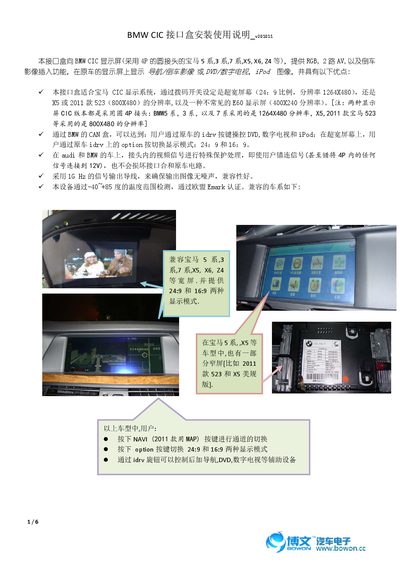
The interface box provides RGB, 2-way AV, and reverse image insertion functions to BMW CIC displays (with 4P round connectors for BMW 5 series, 3 series, 7 series, X5, X6, Z4, etc.), and displays navigation/reverse image or DVD/digital TV, iPod images on the original car display, and has the following advantages: 1. This interface box is suitable for BMW CIC display system, and the display mode can be switched by the option button on the idrv of the original car: 24:9 and 16:9.2. Through BMW's CAN box, users can control DVD, digital TV and iPod through the idrv button of the original car; 3. In audi and BMW cars, the video signals in the connector are specially protected, and even if users connect the signals incorrectly (even connect any signal in the 4P to 12V), they will not damage the interface and the original car circuit.4. Adopt 1G Hz signal output lines to ensure that the output image is noiseless and compatible.5. The device has passed the temperature range test of -40~+85 degrees and the EU Emark certification.
The BMW CIC Interface Box provides RGB, two AV inputs and a rear‑view camera insertion function for compatible BMW CIC displays such as the 5 Series, 3 Series, 7 Series, X5, X6 and Z4. It supports both ultra‑wide 24:9 and standard 16:9 screen ratios and operates within a temperature range of –40 °C to +85 °C.
Installation involves disconnecting the original display connector and plugging it into the box’s 4‑pin socket, then configuring DIP switches for video mode, AV selection and rear‑camera control. The box also offers side buttons, a touch‑screen port and programmable infrared output for controlling DVD, TV and iPod devices via the vehicle’s iDrive controller. This manual is written in Chinese.
| Video amplitude | 0.7 Vpp |
|---|---|
| Sync signal strength | 3~5 Vpp |
| Normal power consumption | 2.4 W (0.2 A @12V) |
| Standby current | < 10 mA |
| Operating temperature range | -40 °C to +85 °C |
| Maximum relay drive voltage | +5 V (max 3 A) |
Press the Option button on the iDrive controller to toggle between 24:9 and 16:9 modes.
It works with BMW 5 Series, 3 Series, 7 Series, X5, X6, Z4 and other wide‑screen models.
Disconnect the original display connector from the vehicle and plug it into the 4‑pin socket on the interface box.