
This document introduces the appearance, buttons, and operation instructions of a multifunctional recording watch. The watch has high-definition digital camera and photography functions, built-in storage, easy operation, small and exquisite design, and is suitable for business, education, security, media, etc.
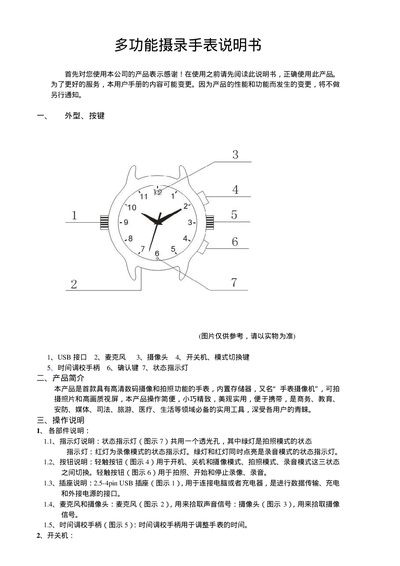
This manual introduces the multifunction videography watch, describing its external features such as the USB interface, microphone, camera, power switch, mode switch key, time‑adjust knob, confirm key, and status indicator. It explains the basic operation steps, including powering on, switching between video, photo, and audio modes, and using the confirm key to start and stop recording.
The guide also covers how to connect the watch to a computer via the supplied USB extension cable, access the removable storage, install the PC camera driver, and set the internal clock. Safety notes, battery charging procedures, and technical specifications are provided at the end of the document. This manual is written in Chinese.
| Video format | AVI |
|---|---|
| Video encoding | M‑JPEG |
| Video resolution | 720×480 VGA |
| Video frame rate | 30 fps |
| Image pixel | 5 MP |
| Battery capacity | 200 mAh |
| Typical working time | ≈70 minutes |
| Interface type | 2.5‑4 pin USB |
| Storage support | micro‑SD card |
| Battery type | High‑capacity polymer lithium |
| Operating temperature | 0 °C to 40 °C |
Short‑press the power key to cycle through video (red LED), photo (green LED), and audio (both LEDs) modes while the watch is in standby.
Connect the watch to a computer USB port or charger; the red LED flashes while charging and stays solid when fully charged.