
This document is a datasheet of the power supply YF-6005P(GPIB). The power supply has a capacity of 0.5 KVA and a voltage range of 0 ~ 300V.
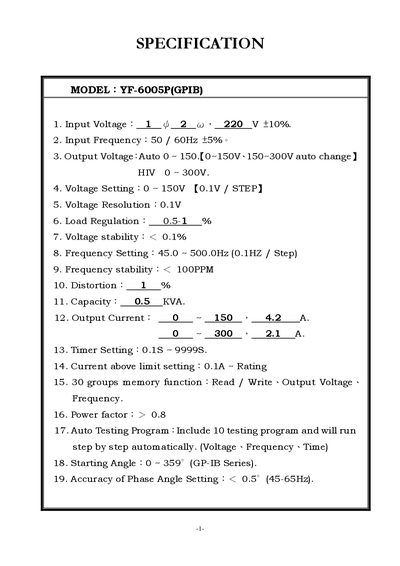
This manual details the technical specifications of the YF-6005P(GPIB) power supply, including input voltage (220 V ±10%), input frequency (50/60 Hz), output voltage range (0‑300 V), resolution, regulation, and protection features. It also describes the device dimensions, environmental limits, and GPIB communication capabilities.
The document explains how to operate the unit via the front‑panel keys, set voltage and frequency, use the built‑in memory functions, and perform auto‑testing programs. Safety and installation notes such as ventilation, temperature, humidity, and protection against overload and over‑temperature are also provided.
| Input Voltage | 220 V ±10% |
|---|---|
| Input Frequency | 50 / 60 Hz |
| Output Voltage | 0 ~ 300 V (auto range) |
| Voltage Resolution | 0.1 V |
| Load Regulation | 0.5‑1 % |
| Voltage Stability | < 0.1 % |
| Frequency Setting | 45.0 ~ 500.0 Hz (0.1 Hz step) |
| Frequency Stability | << 1 OPPM |
| Distortion | 1 % |
| Capacity | 0.5 kVA |
| Output Current | 0‑150 V → 4.2 A; 0‑300 V → 2.1 A |
| Timer Setting | 0.1 s ~ 99 998 s |
| Power Factor | > 0.8 |
| Dimensions (S500VA) | 430 × 515 × 198 mm |
| Operating Temperature | 0 ~ 40 °C |
| Operating Humidity | 10 ~ 90 % |
| Protection Features | NFB switch, overload, short‑circuit, over‑temperature, alarm |
The unit accepts an input voltage of 220 V with a tolerance of ±10 %.
The power supply can store up to 30 memory groups for voltage, frequency, and time settings.
Press the OUT key; the machine will begin outputting the configured voltage and frequency.
The power factor is greater than 0.8.