
This quick start guide will guide you through the initial setup of the WiDRIVE DX-325.
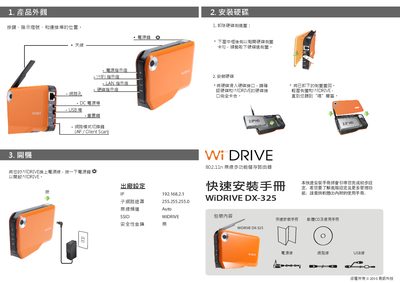
The guide introduces the WiDRIVE DX‑325 router, showing the hardware layout, antenna placement, and power connection. It explains how to switch the device to AP mode using the mode‑switch key.
It then details the configuration process on Windows systems (XP, Vista, 7), including connecting to the wireless network, accessing the web‑based control console, and troubleshooting steps if the network list does not appear. This manual is written in Chinese.
| Wireless Standard | 802.11n |
|---|---|
| Supported Operating Systems | Windows XP, Vista, 7 |
Press the mode‑switch key and select "AP" mode.
Contact your wireless service provider for assistance.
Open a web browser and navigate to the router’s IP address to use the WiDRIVE web control panel.