
ViTiny F300 is a portable electronic magnifier with various functions. It can adjust focus and is equipped with a lens and auxiliary light source. It can be powered by batteries or USB. This product is easy to use and allows for zooming in and out of observed objects, and provides special effects modes. It also has a freeze function and LED light source control. The product is suitable for various observation and magnification needs.
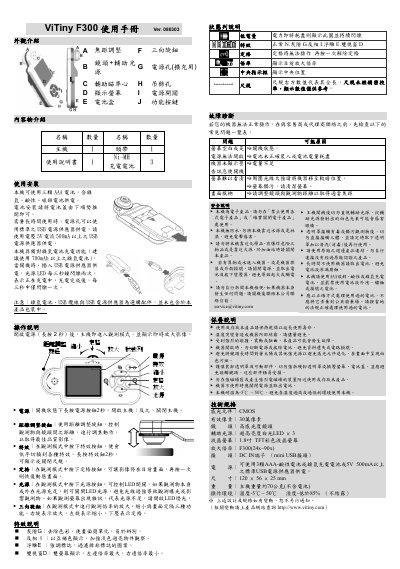
This manual provides an overview of the ViTiny F300 portable observation device, describing its external features, included accessories, and power options. It explains how to install batteries or connect a USB power source and outlines the device's charging behavior.
Detailed operating instructions cover power on/off, focus adjustment, magnification control, special effects, LED illumination, and troubleshooting steps. Safety and maintenance guidelines are also included to ensure reliable and safe use. This manual is written in Chinese.
| Image sensor | CMOS |
|---|---|
| Effective pixels | 300,000 pixels |
| Lens | High‑sensitivity lens |
| Auxiliary light source | 3 × high‑brightness white LEDs |
| Display | 1.8‑inch TFT color LCD |
| Magnification range | 24× ~ 90× |
| Power input | DC IN mini‑USB connector |
| Power source options | 3 × AAA alkaline or Ni‑MH rechargeable batteries, or 5 V ≥ 500 mA USB supply |
| Dimensions | 120 × 56 × 25 mm |
| Weight | ≈ 70 g (without batteries) |
| Operating temperature | -5 °C ~ 50 °C |
Insert a USB power source while the device is off; the LED will flash twice every three seconds to indicate charging, and once every three seconds when fully charged.