
This document is a quick start guide that provides instructions for operating the ST43-15A1 15-inch LCD TV and navigating its menu options. It explains how to turn on the TV, select TV sources, adjust volume and picture settings, and connect the power adapter, VCR, VCD or DVD player, and antenna/cable TV.
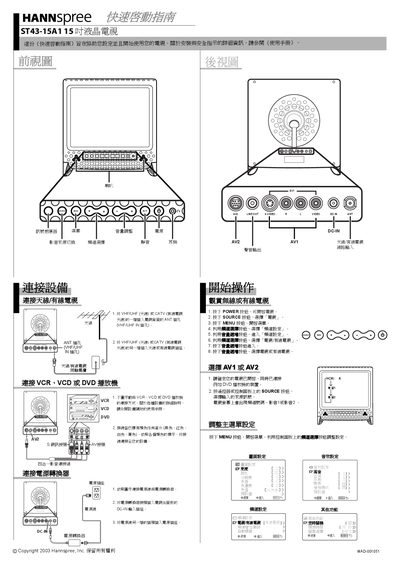
The Quick Start Guide provides basic safety and installation instructions for the ST43-15A1 15‑inch liquid‑crystal TV. It references the full User Manual for detailed safety information and shows how to connect antennas, cable TV, and external devices.
The guide explains how to connect the power adapter, attach color‑coded AV cables, select source inputs (TV, AV1, AV2), and adjust on‑screen display settings using the remote control.
| Screen size | 15 inch |
|---|---|
| Power input connector | DC-IN |
| Antenna input | VHF/UHF IN |
Connect one end of the VHF/UHF (antenna) or CATV cable to the ANT jack, and the other end to the antenna or CATV socket.