
This document is an introduction to the Applica ThinWorks Quick Start Guide. It provides instructions for hardware installation, network configuration, and using the Applica Server Client Program.
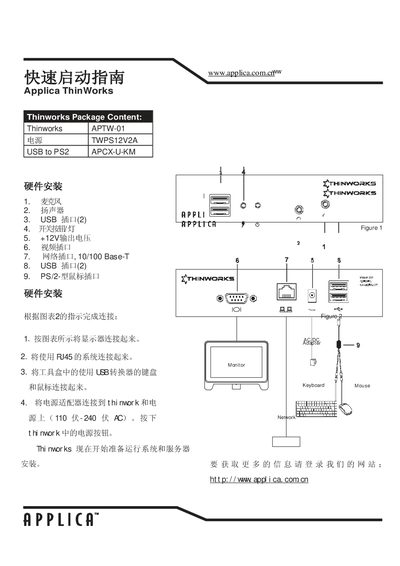
The guide lists the package contents, including the ThinWorks APTW-01 unit, a 12 V 2 A power supply, and a USB‑to‑PS/2 adapter (APCXU‑KM). It shows how to connect the monitor, keyboard, mouse, and network cable, and explains how to power on the system.
It also describes the network configuration process, showing the default IP address, netmask, and gateway, and provides information on the Applica server client program for managing settings and displaying Windows content. This manual is written in Chinese.
| Power supply | 12 V 2 A |
|---|---|
| USB‑to‑PS/2 adapter model | APCXU‑KM |
| Network port type | 10/100 Base‑T |
| Default IP address (example) | 192.168.1.108 |