
This document introduces an SD card speaker with a LCD display and timer remote control function. It can play and pause music, adjust volume, switch functions, etc. It also includes clock adjustment, radio, remote control code matching, and timer remote control functions.
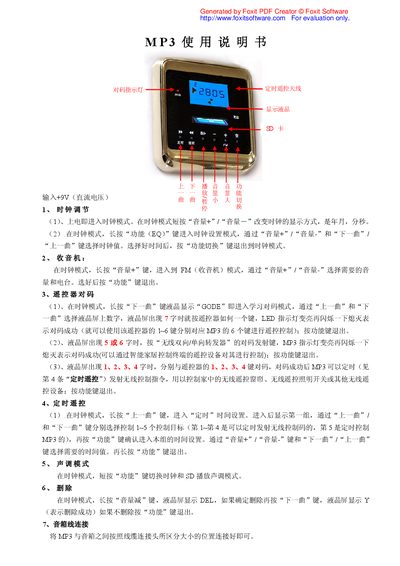
The manual provides step‑by‑step instructions for using the MP3 player. It describes how to adjust the clock, switch between clock and SD playback modes, and set the time using the volume and track buttons.
Additional sections cover FM radio operation, remote control pairing methods, timer‑based remote commands, tone mode selection, file deletion, and connecting the player to external speakers. This manual is written in Chinese.
| Power input | +9V DC |
|---|
Enter clock mode, then short‑press the volume + or – keys to adjust year, month, day, hour, minute, and second; long‑press the function (EQ) key to enter clock setting mode and use the volume and track keys to select values.
In clock mode, long‑press the volume‑minus key until the LCD shows “DEL”, then press the next‑track key to confirm deletion; the LCD will indicate successful deletion.