
This document is the user manual for the Gigabit CCU, which introduces its overview, circuit board diagram, interface definition, and the features and characteristics of the product.
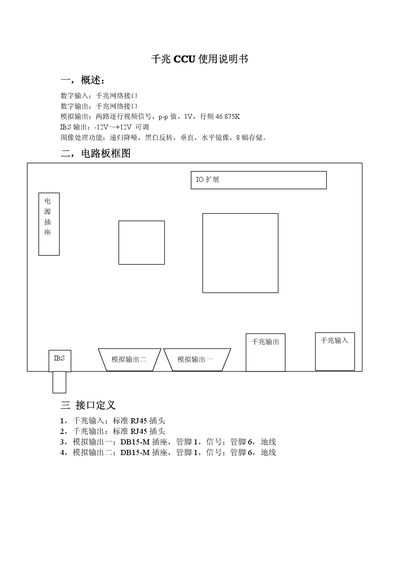
The CCU provides gigabit network interfaces for digital input and output, as well as two analog video outputs with selectable image‑processing functions such as recursive denoising, black‑white inversion, and vertical/horizontal mirroring. It includes a 5 V power socket and RJ45 connectors for the gigabit ports.
The board layout defines RJ45 connectors for gigabit I/O, DB‑15M sockets for analog outputs, and a set of keys to control image‑processing features. The manual lists pin assignments and voltage ranges for each interface. This manual is written in Chinese.
| Digital Input Interface | Gigabit network RJ45 |
|---|---|
| Digital Output Interface | Gigabit network RJ45 |
| Analog Output 1 | Two‑line video signal, p‑p value 1 V, line frequency 46.875 KIBS |
| Analog Output 2 | Two‑line video signal, p‑p value 1 V, line frequency 46.875 KIBS |
| Analog Output Voltage Range | -12 V to +12 V |
| Power Socket Pin 1 | 5 V |
The gigabit input uses a standard RJ45 plug.
The analog output voltage ranges from –12 V to +12 V.
Key 6 activates black‑white inversion.