
This manual introduces the appearance size, installation method, terminal connection method and other contents of FK5420 temperature and humidity controller.
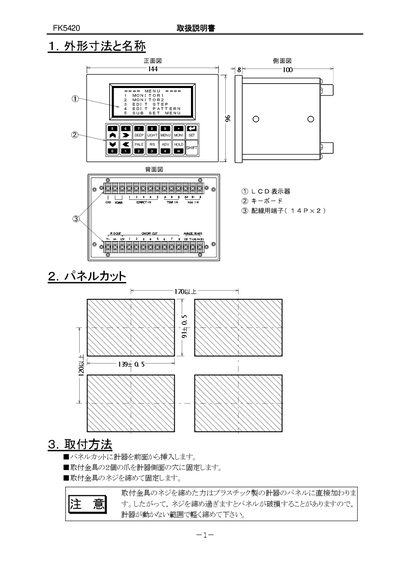
The FK5420 manual provides step‑by‑step instructions for installing the controller, connecting power, grounding, and wiring the various input and output terminals. It explains how to set up PID control, ON/OFF outputs, and conversion outputs, and includes guidance for safe operation and power‑up procedures.
The document also details the function of each key on the LCD panel, how to enter and edit data, adjust screen contrast, and troubleshoot common issues. Safety warnings and environmental requirements are listed to ensure reliable performance. This manual is written in Japanese.
| Grounding requirement | GND terminal must be grounded |
|---|---|
| Contact input voltage (off state) | 5 VDC |
| Contact input current (on state) | ≈2.5 mA |
| Relay contact rating | 250 VAC, 5 A (resistive load) |
| COM terminal current limit | < 8 A |
Use a 250 VAC, 1 A fuse externally, as the unit does not contain an internal fuse.