
This document introduces a microcomputer PID controller with multiple functions, which is suitable for temperature, humidity, flow, and pH value control. It has programmable functions and supports multiple sets of 16-segment settings. It also supports MODBUS communication protocol and has a heater disconnection alarm function. The product offers diverse options for input/output signal types and other peripheral functions.
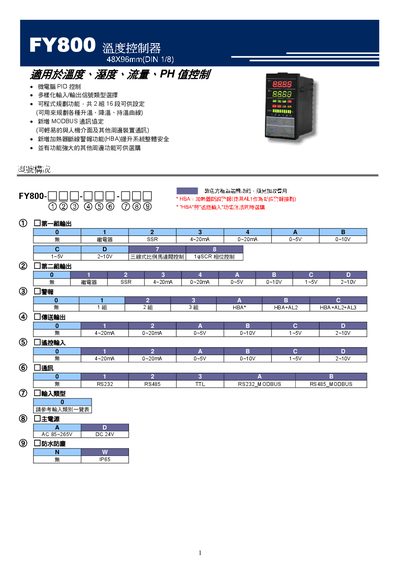
This manual covers the FY800 temperature controller, a micro‑computer PID controller with MODBUS communication, programmable set‑point profiles, and safety features such as heater break alarm. It includes detailed specifications, input/output wiring diagrams, and instructions for basic operation, programming, and troubleshooting.
The document also explains alarm functions, error codes, auto‑tuning procedures, and installation precautions to ensure safe and reliable use in industrial temperature control applications. This manual is written in Chinese.
| AC input voltage | 85~265V |
|---|---|
| DC input voltage (option) | 15‑50V |
| Display accuracy | 0.2 % FS +1 digit |
| Control method | PID, PI, P, ON/OFF, FUZZY |
| Relay contact rating | 1 c |
Press the < key, then the SET key, and use the +/‑ keys to adjust the SV value; the display will show the new set‑point.
Enter the Auto‑Tuning mode by pressing SET, then <, then A, and finally SET again; confirm with YES to start the auto‑tuning process.
Check the corresponding input for open circuit, reverse polarity, or out‑of‑range voltage/current and correct the wiring before restarting the controller.
Connect AC 85‑265 V or DC 24 V to the main power terminals as indicated; ensure correct pin assignments (e.g., FY800 uses Pin 1 and Pin 2).