
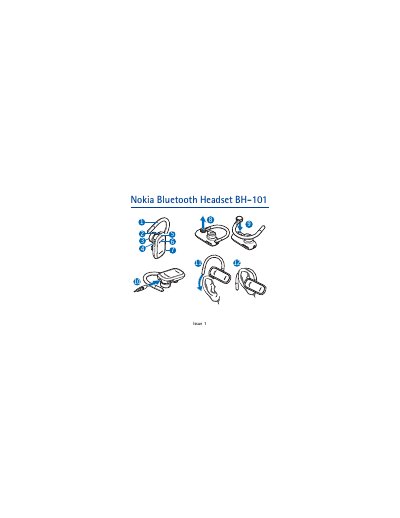
This is the Nokia user guide for the Nokia Bluetooth Headset BH-101 (product code HS-94W), a headset that lets you make and receive calls while on the move with compatible phones that support Bluetooth wireless technology. The guide covers the headset parts, chargers, charging the battery, switching the headset on and off, pairing it with a phone, and everyday use.
The document also explains how to place the headset on the right or left ear, how to handle calls with the multifunction key and volume keys, how to clear pairings or reset the headset, and gives troubleshooting, battery information and care and maintenance advice. The headset complies with Bluetooth Specification 2.0 + EDR, supporting Headset Profile 1.1 and Hands-Free Profile 1.5.
| Bluetooth specification | Bluetooth Specification 2.0 + EDR |
|---|---|
| Supported profiles | Headset Profile 1.1 and Hands-Free Profile 1.5 |
| Operating range | 10 metres (33 feet) |
| Talk time | up to 8 hours |
| Standby time | up to 180 hours |
| Charging time | up to 2 hours for a full charge |
| Compatible chargers | AC-3, AC-4, and DC-4 |
| Pairing passcode | 0000 |
Switch the headset off, then press and hold the multifunction key for about 8 seconds until the green indicator light flashes quickly. Activate Bluetooth on the phone, select the headset from the found devices and enter the passcode 0000.
Charging the battery fully may take up to 2 hours. The indicator light is red while charging and turns green when the battery is fully charged.
To delete the pairings, switch on the headset and press and hold the multifunction key and the volume up key for about 5 seconds until the indicator light alternates between red and green. To reset a headset that stops functioning although charged, press and hold the multifunction key and plug the headset into a charger.
A fully charged battery has power for up to 8 hours of talk time or up to 180 hours of standby time.