
Key facts
- Manuals
- 9
- Categories
- 1
- Languages
- EN · JA
- Last added
- 2012-06-05
Featured Matrix manuals
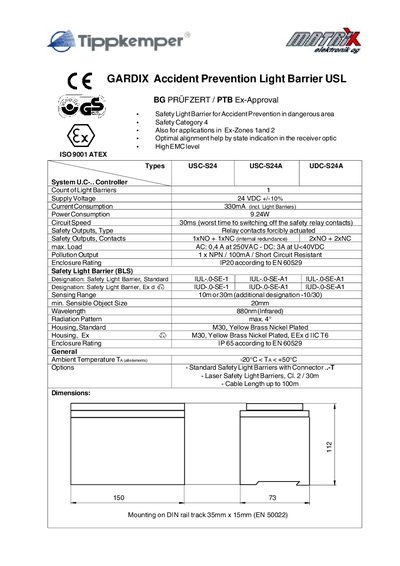
Gardix USC Safety Light Barrier Technology Data
The Gardix USC safety light barrier is designed for accident prevention in hazardous areas, offering safety category 4 compliance and suitability for Ex‑Zones 1 and 2. It provides alignment assistance via state indication in the receiver optic and meets high EMC standards.
The document lists detailed electrical specifications, connection layouts for various controller types (USC‑S24, USC‑S24A, UDC‑S24A), and the required safety and regulatory approvals such as ATEX, PTB Ex‑83/1072, and EN standards.
Covers: General · Specifications · Connection Layout · Safety Outputs · Ex‑Protection · Approvals

JFX MATRIX TRADER iPhone User Manual
This manual describes the steps to download the MATRIX TRADER iPhone version from the App Store, configure the app, and navigate its main screens. It covers account management, real‑time rate display, order entry, and settings such as automatic update intervals.
The guide also explains how to monitor margin information, view position details, and receive notifications and news within the app. Screenshots and menu descriptions help users operate the app efficiently for trading the supported 21 currency pairs. This manual is written in Japanese.
Covers: Download and Installation · Main Screen Overview · Rate List and Real‑time Updates · Account and Margin Management · Order Entry and Position Details · Settings and Automatic Update
Latest Matrix manuals
MATRIX Matrix Multimedia Atmel AVR Board EB19430 Manual
Matrix Multimedia Atmel AVR® Board EB19430 is a development board based on Atmel AVR® produced by Matrix Multimedia Limited.
MATRIX AVR C pRogRAmming pACk
eBLOCKS TM learn design build EB671SI AVR C pRogRAmming pACk is a kit for learning and developing AVR projects, including E-blocks development boards, C for AVR CD ROM, USB cable, power supply, etc.
MATRIX Version 3 PICmicro microcontroller development board Manual
This flexible development board allows you to learn both how to program PICmicro microcontrollers as well as program a range of 8, 14, 18, 28, and 40 pin devices from the 12, 16 and 18 series PICmicro ranges. All programming software is included in the PPP utility which is supplied with the board. Makes it easier to teach and learn PICmicro programming. Designed for learning and teaching. 3 CD ROM based resources in assembly, C, and flow chart programming are available. Large range of add-ons and security options make this ideal for educational use. Makes it easier to develop PICmicro projects. Compatible with the E-blocks™ range of circuit boards. Supports low cost Flash-programmable PICmicro devices. Fully featured displays - 16 individual LEDs, quad 7-segment display and LCD display. On-board sensors. Compatible with more than 30 additional sensors. Fully protected expansion bus for project work.
MATRIX Internet board datasheet EB023-00-1 Manual
This manual introduces the E-blocks internet board EB023 product information, including product introduction, appearance, circuit diagram, etc.
MATRIX USB232 board EB039-00-1 Technical datasheet
This is the technical datasheet for E-blocks USB232 board version 1.
Gardix USC Safety Light Barrier Technology Data
Datasheet 2 pages · 41 KB · ENTechnical data for Gardix USC safety light barrier, including specifications, connection layout, and safety approvals.
JFX MATRIX TRADER iPhone User Manual
User Manual 23 pages · 2.5 MB · JAThe JFX MATRIX TRADER iPhone User Manual explains how to download, set up, and use the app for forex trading.
MATRIX DA-100plus digital audio decoder user manual
MATRIX 2-Channel 24-bit 192-kHz ASRC desktop digital audio CPU Manual
Which document do I need?
Datasheet
Ratings, dimensions and ordering codes, for selection and design work.
User Manual
Day-to-day operation, settings and troubleshooting. Start here if the product is already set up.
Questions answered in Matrix manuals
What supply voltage does the Gardix USC safety light barrier require?
It operates from a 24 VDC supply with a tolerance of +/- 10 %.
What are the safety output contact configurations?
The device provides either 1 NO + 1 NC with internal redundancy or 2 NO + 2 NC contacts.
How do I download the MATRIX TRADER iPhone app?
Open the App Store, search for “MATRIX TRADER iPhone”, and download the app.
How can I view real‑time exchange rates?
The Rate List screen shows BID and ASK prices that update automatically (e.g., at 18:09:3B).