
Key facts
- Manuals
- 1
- Languages
- EN
- Last added
- 2026-11-23
Featured Deadman manuals
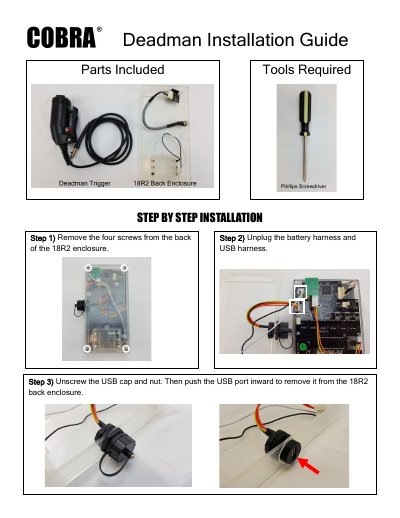
Deadman 18R2 Installation Guide
Installation Guide 2 pages · 1.1 MB · EN
This Deadman Installation Guide provides step-by-step instructions for installing the Deadman trigger on the 18R2 enclosure.
It covers removing the old USB port, reconnecting the battery and USB harnesses, plugging in the Deadman board, and inserting the Deadman trigger button side up.
Covers: Parts Included · Tools Required · Step By Step Installation
Latest Deadman manuals
Deadman 18R2 Installation Guide
Installation Guide 2 pages · 1.1 MB · ENStep-by-step instructions for installing the Deadman trigger and replacing the USB port on the back of the 18R2 enclosure.
Which document do I need?
Installation Guide
Mounting, wiring and first power-up. Read it before the hardware goes in.
Questions answered in Deadman manuals
How do you remove the USB port from the 18R2 back enclosure?
Unscrew the USB cap and nut, then push the USB port inward to remove it.
Which side should the Deadman trigger face when inserted?
Insert it button side up into the Deadman port.