
Key facts
- Manuals
- 1
- Languages
- ZH
- Last added
- 2026-11-23
Featured EZB manuals
EZB EZB-Timer Series Timer Module User Manual
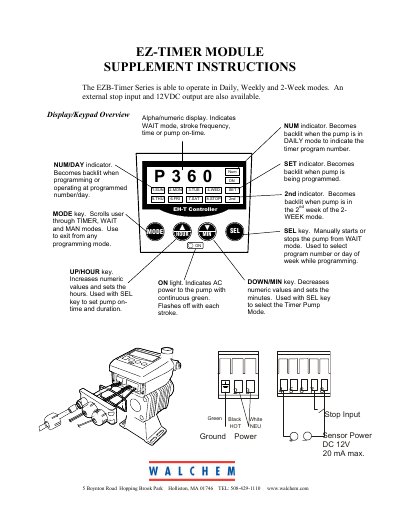
This manual explains how to operate the EZB-Timer Series timer module in daily, weekly, and 2-week modes. It covers setting time and date, selecting modes, programming pump operations, and manual control. The module features an alpha/numeric display and keypad for navigation and configuration.
The module includes an external stop input and 12VDC output. Programming is done via the MODE, SEL, UP, and DOWN keys to set hours, minutes, days, and pump run times. The display indicates current mode and settings with backlight indicators. This manual is written in Chinese.
Covers: Display/Keypad Overview · Mode Selection · Time/Date Setting · Timer Programming · Manual Operation · Timer Operation
Latest EZB manuals
EZB EZB-Timer Series Timer Module User Manual
User Manual 4 pages · 112 KB · ZHUser manual for EZB-Timer Series timer module with daily, weekly, and 2-week modes, external stop input, and 12VDC output.
Which document do I need?
User Manual
Day-to-day operation, settings and troubleshooting. Start here if the product is already set up.
Questions answered in EZB manuals
How do I set the time and date on the EZB-Timer?
From the WAIT menu, hold the SEL key for 3 seconds to enter Time/Date SET menu. Use HOUR and MIN keys to set time (24-hour clock), and SEL to cycle through days of the week.
How do I switch between timer modes?
Press MIN and SEL keys together to access Mode Selection menu. Use UP and DOWN keys to cycle through Daily, Weekly, or 2-Week modes, then press MODE to confirm.