
Key facts
- Manuals
- 1
- Languages
- EN
- Last added
- 2026-11-17
Featured Florida Atlantic University manuals
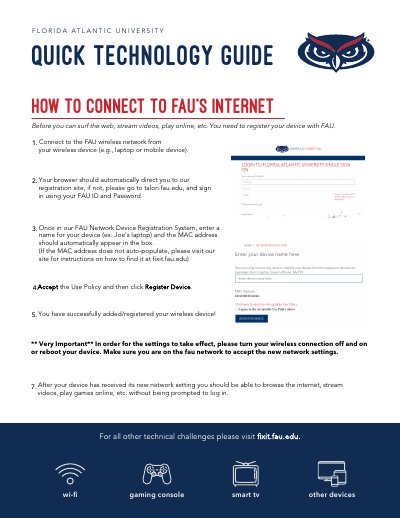
FAU Wireless Network Connection Guide
This quick technology guide from Florida Atlantic University explains how to connect devices such as gaming consoles, smart TVs, and other wireless devices to the FAU internet. Users must connect to the FAU wireless network, visit the registration site at talon.fau.edu, sign in with their FAU ID and password, enter a device name and MAC address, accept the use policy, and register the device.
After registration, users must turn their wireless connection off and on or reboot the device to apply the new network settings. Once the device receives the new settings, it can browse the internet, stream videos, and play games online without further login prompts.
Covers: Connect to FAU wireless network · Device registration at talon.fau.edu · Enter device name and MAC address · Accept use policy · Reboot device to apply settings
Latest Florida Atlantic University manuals
FAU Wireless Network Connection Guide
Other 1 pages · 747 KB · ENGuide for registering and connecting devices to the Florida Atlantic University wireless network.
Questions answered in Florida Atlantic University manuals
What should I do after registering my device on the FAU network?
Turn your wireless connection off and on or reboot your device to apply the new network settings.
What is the URL to access the FAU network registration site?
You should go to talon.fau.edu to sign in.