
Key facts
- Manuals
- 1
- Languages
- EN
- Last added
- 2026-11-16
Featured TT6000 manuals
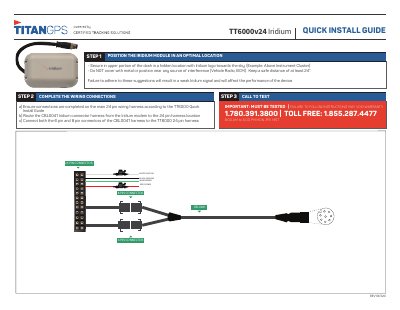
TT6000v24 Iridium Quick Install Guide
This guide provides step-by-step instructions for installing the TT6000v24 Iridium module. It covers wiring connections using the CBL0041 harness and positioning the module in an optimal location on the vehicle dashboard. Testing is required to ensure proper signal reception and device performance.
The guide includes important warnings about interference and warranty voidance if instructions are not followed. Contact information is provided for support.
Covers: STEP 2 COMPLETE THE WIRING CONNECTIONS · STEP 3 CALL TO TEST · STEP 1 POSITION THE IRIDIUM MODULE IN AN OPTIMAL LOCATION · IMPORTANT: MUST BE TESTED
Latest TT6000 manuals
TT6000v24 Iridium Quick Install Guide
Quick Start Guide 1 pages · 122 KB · ENQuick installation guide for the TT6000v24 Iridium module, covering wiring, positioning, and testing steps.
Which document do I need?
Quick Start Guide
The shortest path to a working setup, usually only a few pages.
Questions answered in TT6000 manuals
Where should the Iridium module be positioned?
Secure the module in the upper portion of the dash in a hidden location with the Iridium logo towards the sky.
What is the minimum safe distance required for the Iridium module?
The module must be kept at a safe distance of at least 24 inches from sources of interference.