
Key facts
- Manuals
- 1
- Languages
- EN
- Last added
- 2023-11-29
Featured Horizon Display manuals
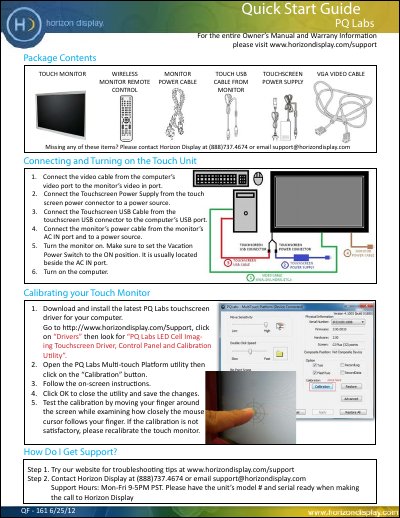
Horizon Display PQ Labs Touch Monitor Quick Start Guide
This guide helps you set up your Horizon Display PQ Labs touch monitor. Connect the video, power, and USB cables, install the driver, and calibrate the touchscreen. For support, contact Horizon Display via phone or email with your model and serial number.
Covers: Package Contents · Connecting and Turning on the Touch Unit · Calibrating your Touch Monitor · How Do I Get Support?
Latest Horizon Display manuals
Horizon Display PQ Labs Touch Monitor Quick Start Guide
Quick Start Guide 1 pages · 139 KB · ENQuick Start Guide for Horizon Display PQ Labs touch monitor, covering setup, calibration, and support.
Which document do I need?
Quick Start Guide
The shortest path to a working setup, usually only a few pages.
Questions answered in Horizon Display manuals
How do I calibrate my touch monitor?
Open the PQ Labs Multi-touch Platform utility, click the 'Calibration' button, follow on-screen instructions, then click OK to save changes.
From: Horizon Display PQ Labs Touch Monitor Quick Start Guide
What should I do if the calibration is not satisfactory?
Recalibrate the touch monitor.
From: Horizon Display PQ Labs Touch Monitor Quick Start Guide