
Key facts
- Manuals
- 1
- Languages
- EN
- Last added
- 2026-11-16
Featured Converge manuals
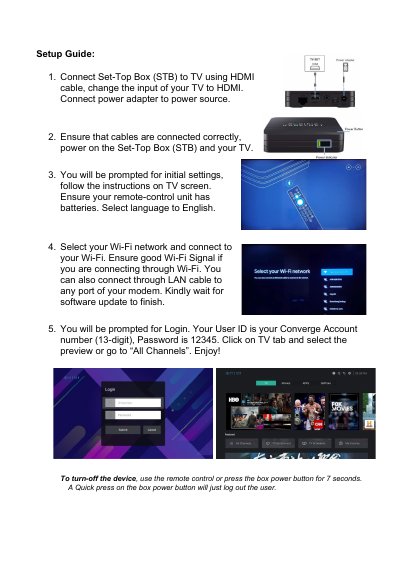
Converge Set-Top Box (STB) Setup Guide
This one-page setup guide from Converge explains how to get a Set-Top Box (STB) running with a TV. It starts with connecting the box to the TV with an HDMI cable, changing the TV input to HDMI and connecting the power adapter to a power source, then powering on both the box and the TV after checking that the cables are connected correctly.
The guide then walks through the on-screen initial settings, selecting English as the language, joining a Wi-Fi network or using a LAN cable to any port of the modem, and waiting for the software update to finish. It ends with the login step, where the User ID is the 13-digit Converge account number and the password is 12345, and with instructions for turning the device off using the remote control or the box power button.
Covers: Connecting the STB to the TV with an HDMI cable · Connecting the power adapter · Powering on the STB and TV · Initial settings and language selection · Wi-Fi or LAN connection · Software update
Latest Converge manuals
Converge Set-Top Box (STB) Setup Guide
Quick Start Guide 1 pages · 164 KB · ENOne-page Converge Set-Top Box setup guide: HDMI and power connection, initial settings, Wi-Fi or LAN, software update, login and power off.
Which document do I need?
Quick Start Guide
The shortest path to a working setup, usually only a few pages.
Questions answered in Converge manuals
What is the default password for the Converge Set-Top Box login?
The password is 12345, and the User ID is your 13-digit Converge account number.
How do I turn off the Set-Top Box?
Use the remote control, or press the box power button for 7 seconds. A quick press only logs the user out.