
Key facts
- Manuals
- 1
- Languages
- ZH
- Last added
- 2026-11-16
Featured Alaska Native Tribal Health Consortium manuals
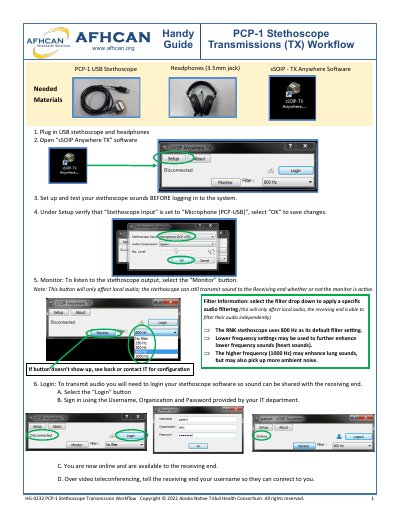
Alaska Native Tribal Health Consortium PCP-1 Stethoscope Transmission Workflow Guide
This guide explains how to use the PCP-1 stethoscope transmission system for remote medical consultations. It covers connecting hardware, configuring audio settings, logging in, and managing calls. The guide also includes troubleshooting tips for common issues like missing monitor buttons or audio problems.
The system requires the PCP-1 USB stethoscope, headphones, and the sSOIP - TX Anywhere software. Audio can be filtered locally, and transmission is managed through login and call acceptance steps. The guide emphasizes verifying hardware connections and audio settings before use. This manual is written in Chinese.
Covers: Needed Materials · Setup and Test · Login · Monitor Button · Audio Filtering · Accept Call
Latest Alaska Native Tribal Health Consortium manuals
Alaska Native Tribal Health Consortium PCP-1 Stethoscope Transmission Workflow Guide
User Manual 2 pages · 1.4 MB · ZHUser guide for the PCP-1 stethoscope transmission system, covering setup, login, audio filtering, and troubleshooting for remote medical consultations.
Which document do I need?
User Manual
Day-to-day operation, settings and troubleshooting. Start here if the product is already set up.
Questions answered in Alaska Native Tribal Health Consortium manuals
How do I set up the stethoscope for transmission?
Plug in the USB stethoscope and headphones, open the sSOIP - TX Anywhere software, and set the 'Stethoscope Input' to 'Microphone (PCP -USB)' under Setup.
From: Alaska Native Tribal Health Consortium PCP-1 Stethoscope Transmission Workflow Guide
What is the default audio filter for the RNK stethoscope?
The default filter setting is 800 Hz, which can be adjusted to enhance lower or higher frequency sounds.
From: Alaska Native Tribal Health Consortium PCP-1 Stethoscope Transmission Workflow Guide