
Key facts
- Manuals
- 1
- Languages
- ES
- Last added
- 2023-11-22
Featured VideoShow manuals
VideoShow for Android Video Editing User Manual
This document is a Spanish-language user manual for the VideoShow video-editing app for Android. It explains installation from the Play Store and the main editing workflow, and notes that some functions may not be useful for the final product but are explained so users know how they work.
It describes the TEMAS, SONAR, Editar, Configuración, and Diapositivas options, including music, sound effects, voice-over, clips, subtitles, transitions, filters, effects, stickers, watermark, pixelation, blur, GIFs, added clips, classification method, aspect ratio, background, and musical transition. This manual is written in Spanish.
Covers: Puntos a tomar en cuenta · Play Store installation · Opening the app and selecting a video · TEMAS · SONAR · Editar
Latest VideoShow manuals
VideoShow for Android Video Editing User Manual
User Manual 6 pages · 783 KB · ESSpanish-language user manual for the VideoShow video-editing app for Android.
Which document do I need?
User Manual
Day-to-day operation, settings and troubleshooting. Start here if the product is already set up.
Questions answered in VideoShow manuals
How do I install VideoShow?
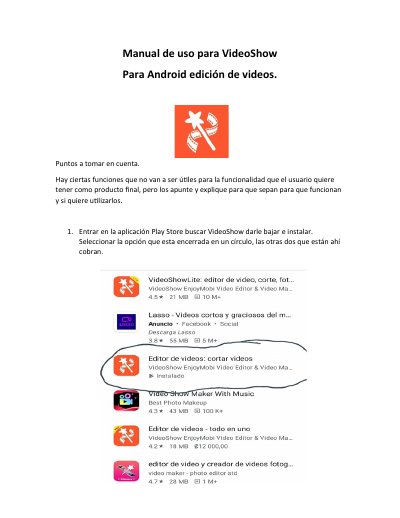
Enter the Play Store, search for VideoShow, download and install it, then select the option enclosed in a circle; the other two options charge.
What options are under SONAR?
Music, multi-music, sound effect, and voice-over.