
Key facts
- Manuals
- 1
- Languages
- EN
- Last added
- 2023-11-16
Featured easytrans manuals
easytrans 800 TD-LTE Wireless Data Terminal User Manual
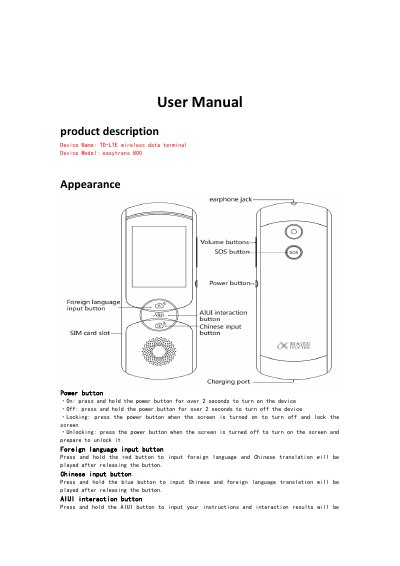
The easytrans 800 is a TD-LTE wireless data terminal with a power button, foreign language and Chinese input buttons, an AIUI interaction button, volume buttons, a 3.5mm earphone jack, a SIM card slot, and an SOS button. Pressing and holding the power button for over 2 seconds turns the device on or off.
The manual describes the setup guide, multiple-language translation, AIUI intelligent interaction, image translation, language study, human translation, SOS emergency contact, iFLYTEK roaming, WLAN/hotspot and system settings, and important safety information for the translation machine.
Covers: Appearance · Setup Guide · Multiple-language translation · AIUI intelligent interaction · Image translation · SOS emergency contact
Latest easytrans manuals
easytrans 800 TD-LTE Wireless Data Terminal User Manual
User Manual 9 pages · 431 KB · ENThe easytrans 800 TD-LTE Wireless Data Terminal User Manual covers device appearance, button functions, setup, translation features, SOS emergency contact…
Which document do I need?
User Manual
Day-to-day operation, settings and troubleshooting. Start here if the product is already set up.
Questions answered in easytrans manuals
How do I turn on the easytrans 800?
Press and hold the power button for over 2 seconds.
From: easytrans 800 TD-LTE Wireless Data Terminal User Manual
What languages does offline translation support?
It supports offline translation between Chinese and English.
From: easytrans 800 TD-LTE Wireless Data Terminal User Manual