
Key facts
- Manuals
- 1
- Languages
- ZH
- Last added
- 2023-10-26
Featured OS-NET manuals
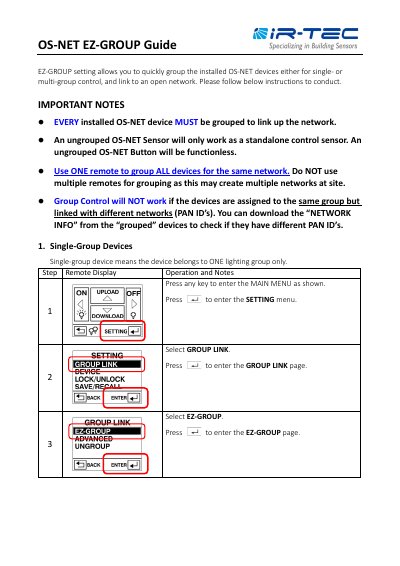
OS-NET EZ-GROUP User Manual
This manual explains how to group OS-NET devices using the EZ-GROUP feature for single or multi-group control. Devices must be grouped to connect to an open network; ungrouped devices function as standalone sensors or buttons. Use one remote to group all devices to avoid multiple networks. The guide includes step-by-step instructions for assigning group numbers and confirming successful network linkage via LED indicators.
The manual covers both single-group and multi-group setups, allowing devices to belong to up to four groups. It details remote operations, upload confirmation (via beeps and LED flashes), and troubleshooting for failed uploads. The process ensures devices are linked to the same network (same PAN ID) for proper group control. This manual is written in Chinese.
Covers: Single-Group Devices · Multi-Group Devices · Group Link Setup · Remote Operation · LED Indicators · Upload Confirmation
Latest OS-NET manuals
OS-NET EZ-GROUP User Manual
User Manual 3 pages · 281 KB · ZHUser guide for grouping OS-NET devices into single or multi-group control with remote setup.
Which document do I need?
User Manual
Day-to-day operation, settings and troubleshooting. Start here if the product is already set up.
Questions answered in OS-NET manuals
What happens if a device is not grouped?
An ungrouped OS-NET Sensor will only work as a standalone control sensor. An ungrouped OS-NET Button will be function less.
How do I confirm a device is successfully linked to the network?
The sensor will blink its LED in BLUE and GREEN intermittently while linking up the network and eventually display in GREEN to indicate successful network linkage.