
Key facts
- Manuals
- 1
- Languages
- EN
- Last added
- 2023-10-26
Featured TextHelp manuals
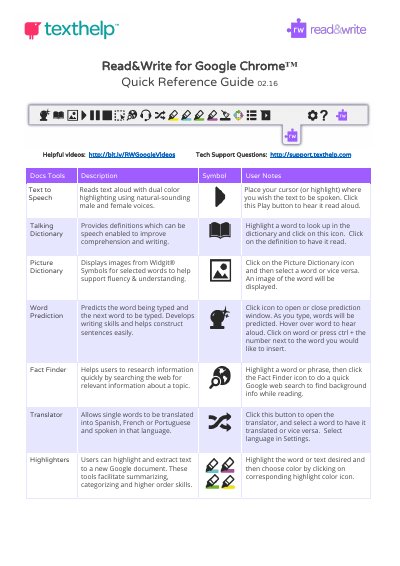
TextHelp Read&Write for Google Chrome Quick Reference Guide
This guide explains how to use TextHelp's Read&Write extension for Google Chrome. It covers tools like text-to-speech, talking dictionary, picture dictionary, word prediction, fact finder, and translator. Tools for highlighting, vocabulary building, speech input, and screenshot reading are also described. The guide includes web and PDF-specific features, such as simplify, push pin annotations, and typewriter annotations. Settings and help resources are also covered.
Covers: Text to Speech · Talking Dictionary · Picture Dictionary · Word Prediction · Fact Finder · Translator
Latest TextHelp manuals
TextHelp Read&Write for Google Chrome Quick Reference Guide
Quick Start Guide 7 pages · 367 KB · ENQuick reference guide for TextHelp's Read&Write Chrome extension, covering text-to-speech, dictionary, translation, and study tools.
Which document do I need?
Quick Start Guide
The shortest path to a working setup, usually only a few pages.
Questions answered in TextHelp manuals
What does the Text to Speech tool do?
Reads text aloud with dual color highlighting using natural-sounding male and female voices.
From: TextHelp Read&Write for Google Chrome Quick Reference Guide
How do you use the Talking Dictionary?
Highlight a word to look up in the dictionary and click on this icon. Click on the picture of the speaker to have the definition read aloud.
From: TextHelp Read&Write for Google Chrome Quick Reference Guide