
Key facts
- Manuals
- 1
- Languages
- EN
- Last added
- 2023-10-21
Featured The WhiTe STone Group, inc. manuals
The WhiTe STone Group, inc. PixCert® User Guide
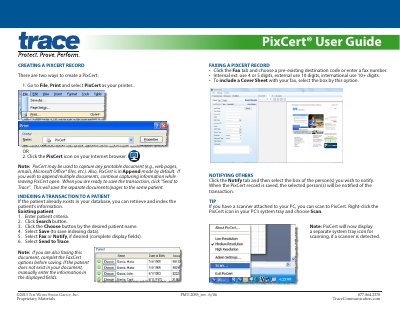
PixCert® allows users to capture printable documents like web pages or emails and save them to a patient record. Users can index transactions to existing patients or create new patient records. The tool also supports faxing and notifying others via its interface.
PixCert® can be accessed through a browser or printer settings, and includes scanning functionality if a scanner is connected. It saves documents in append mode and offers options for faxing with cover sheets or notifying recipients.
Covers: Creating a PixCert Record · Indexing a Transaction to a Patient · Notifying Others · Faxing a PixCert Record · Scanning to PixCert
Latest The WhiTe STone Group, inc. manuals
The WhiTe STone Group, inc. PixCert® User Guide
User Manual 1 pages · 187 KB · ENUser guide for PixCert®, a tool to capture and index printable documents for patient transactions.
Which document do I need?
User Manual
Day-to-day operation, settings and troubleshooting. Start here if the product is already set up.
Questions answered in The WhiTe STone Group, inc. manuals
How do I create a PixCert record?
Go to File, Print and select PixCert as your printer, or click the PixCert icon on your Internet browser.
How do I index a transaction to an existing patient?
Enter patient criteria, click Search, choose the patient, select Save, and then select Fax or Notify if desired.