
Key facts
- Manuals
- 4
- Languages
- EN
- Last added
- 2023-10-19
Featured Obsermet manuals
Obsermet OMC-938/939 Mini Weather Station User Manual
This manual provides instructions for installing and commissioning the Obsermet OMC-938/939 mini weather station. It details mechanical mounting, electrical connections, daisy chaining, and power supply settings. The device displays wind speed and direction along with four other parameters using LED indicators and accepts signals from OMC-182/183 units. Maintenance includes software updates via RS232.
The unit supports multiple display units and can output analog signals for wind speed and direction. It is housed in a DIN-size casing suitable for flush mounting and includes brightness controls and front-panel settings for units, averaging, and lamp tests.
Covers: General · Installation · Commissioning · Maintenance · Setup via RS232 port
Obsermet OMC-934 Digital 4-Parameter Display User Manual
This manual provides instructions for installing and commissioning the Obsermet OMC-934 digital display unit, which features four 5-digit LED displays. It details electrical connections, power supply options (220Vac, 115Vac, 24Vdc, 12Vdc), and daisy chaining for multiple displays. The unit supports RS422 or current loop inputs, pulse and potentiometer inputs, and optional analogue outputs. Commissioning sections cover wind, tidal, and QFE/QNH applications, including front panel brightness control and RS232 settings for custom configurations.
The OMC-934 is designed for flush mounting in consoles or panels, with a DIN-size casing (144x144x94 mm). It includes a 15V DC sensor supply and can be configured for various display units and input ranges. The manual also explains how to modify power supply settings via jumper wires and how to connect sensors for wind speed and direction, tidal data, or other parameters.
Covers: General · Installation · Commissioning · Maintenance · Setting up procedure
Obsermet OMC-137 Wind Display Unit User Manual
The Obsermet OMC-137 is an advanced wind display unit designed for aeronautical applications, featuring a double LED circle for wind direction and variation, along with a 3-digit numeric display for average wind direction and speed statistics. It meets ICAO requirements and can be integrated into complete meteorological systems, supporting various input sensors including the OMC-160, OMC-172, and OMC-176.
Covers: General · Installation · Commissioning · Maintenance · Input menu · Output menu
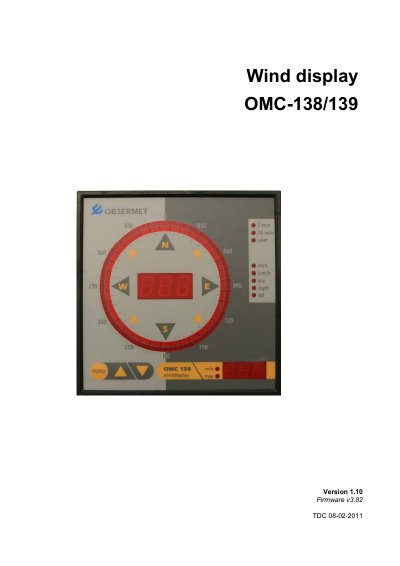
Obsermet OMC-138/139 Wind Display User Manual
The Obsermet OMC-138 and OMC-139 are digital wind displays designed to show wind speed and direction. The OMC-138 features a 3-digit LED speed display, a 36-LED circular direction indicator, and a gust display, while the OMC-139 is a marine variant with a 0...180 degree scale. Both units accept signals directly from Obsermet OMC-160 and OMC-170 wind sensors and provide power to them via a 15V DC supply.
Covers: General · Installation · Commissioning · Settings via Front Panel · Settings via RS232 Port · Maintenance
Latest Obsermet manuals
Obsermet OMC-938/939 Mini Weather Station User Manual
User Manual 25 pages · 309 KB · ENUser manual for Obsermet's OMC-938/939 mini weather station, covering installation, commissioning, and maintenance.
Obsermet OMC-934 Digital 4-Parameter Display User Manual
User Manual 23 pages · 260 KB · ENUser manual for Obsermet's OMC-934 digital display, covering installation, commissioning, and settings for wind, tidal, and QFE/QNH applications.
Obsermet OMC-137 Wind Display Unit User Manual
User Manual 29 pages · 358 KB · ENThis manual covers the installation, commissioning, maintenance, and configuration of the Obsermet OMC-137 Advanced wind display unit for aeronautical purposes.
Obsermet OMC-138/139 Wind Display User Manual
User Manual 21 pages · 372 KB · ENThis user manual covers the installation, commissioning, settings, and maintenance of the Obsermet OMC-138 and OMC-139 digital wind displays.
Which document do I need?
User Manual
Day-to-day operation, settings and troubleshooting. Start here if the product is already set up.
Questions answered in Obsermet manuals
What power supply options are available for the OMC-938/939?
The unit supports 220Vac, 115Vac, and 24Vdc power supply, selectable via wire bridges on the power supply board.
How is the OMC-938/939 mounted?
It requires a 282mm x 137mm square panel cut-out, with maximum panel thickness of 5 mm, and rear access for cable connections.
What power supply options are available for the OMC-934?
The OMC-934 supports 220Vac, 115Vac, 24Vdc, and 12Vdc power supplies, selectable via wire bridges or transformer modification.
From: Obsermet OMC-934 Digital 4-Parameter Display User Manual
Can the OMC-934 be used for tidal displays?
Yes, using a OMC-3994 signal conversion module to convert RS232 output to RS422 or current loop for connection to terminals 7 and 8.
From: Obsermet OMC-934 Digital 4-Parameter Display User Manual
What wind sensors are compatible with the OMC-137?
The unit is primarily intended for use with the Obsermet OMC-160 wind sensor, but other sensors like the OMC-172 and OMC-176 can also be connected.
Can the OMC-137 be daisy-chained to other displays?
Yes, as all Obsermet wind display units have a 'daisy chain' provision, input data can be taken from another Obsermet wind display unit.