
Key facts
- Manuals
- 1
- Languages
- EN
- Last added
- 2023-10-19
Featured Great Okinawa Trade Fair manuals
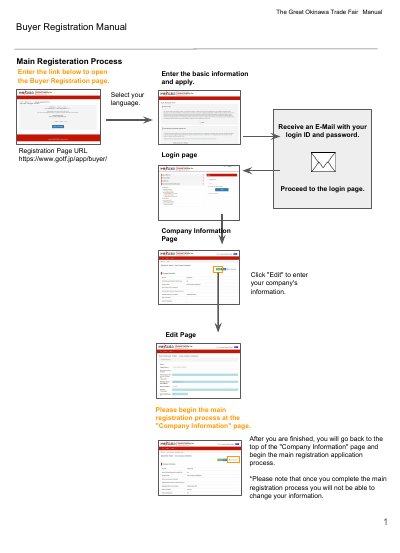
Great Okinawa Trade Fair Buyer Registration Manual
This manual guides users through the registration process for the Great Okinawa Trade Fair. It covers selecting a language, entering company details, confirming information, and receiving login credentials via email. Users are warned that once main registration is completed, they cannot change their information.
After logging in, users can edit company information and finalize registration by clicking "Main Registration". The process includes email verification and a confirmation page before final submission.
Covers: Registration Page URL · Login Page URL · Company Information Page · Edit Page · Main Registration Process · Email Confirmation
Latest Great Okinawa Trade Fair manuals
Great Okinawa Trade Fair Buyer Registration Manual
User Manual 8 pages · 1.9 MB · ENStep-by-step guide to register as a buyer for the Great Okinawa Trade Fair, including login, company info, and confirmation steps.
Which document do I need?
User Manual
Day-to-day operation, settings and troubleshooting. Start here if the product is already set up.
Questions answered in Great Okinawa Trade Fair manuals
What happens after I complete the main registration process?
You will not be able to change your information because the reviewing and translation work will begin.
How do I receive my login credentials?
You will receive an E-Mail with your login ID and password to the E-Mail address you provided.