
Key facts
- Manuals
- 1
- Languages
- PT
- Last added
- 2026-10-27
Featured SEBRAE manuals
SEBRAE NF-e and CT-e Issuer Installation Guide
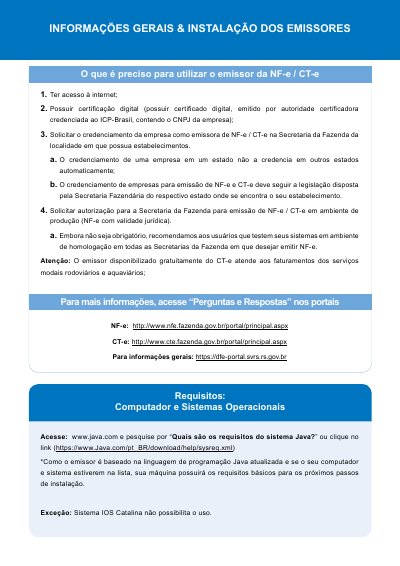
The document provides general information and step-by-step instructions for installing the SEBRAE NF-e and CT-e issuers. It outlines prerequisites such as internet access, digital certification, and authorization from the State Secretary of Finance. Key technical requirements include having a computer with Java Runtime Environment (JRE) installed before downloading the software. This manual is written in Portuguese.
Covers: O que é preciso para utilizar o emissor · Requisitos: Computador e Sistemas Operacionais · Passos para instalação dos emissores · Instalar o Java no computador · Fazer o download do Emissor · Sistema Operacional: LINUX ou MAC
Latest SEBRAE manuals
SEBRAE NF-e and CT-e Issuer Installation Guide
Installation Guide 4 pages · 1.2 MB · PTThis guide explains how to install the SEBRAE electronic invoice (NF-e) and fiscal receipt (CT-e) issuer software, covering system requirements like Java…
Which document do I need?
Installation Guide
Mounting, wiring and first power-up. Read it before the hardware goes in.
Questions answered in SEBRAE manuals
What operating systems are supported by the SEBRAE issuer?
The installer supports Linux or MAC systems, and Windows systems do not require creating a database folder.
What is required to use the free CT-e issuer for road and waterway services?
Users must have internet access, digital certification containing their company CNPJ, and authorization from the local State Secretariat of Finance.