
Key facts
- Manuals
- 1
- Languages
- EN
- Last added
- 2026-11-08
Featured Smith-Victor manuals
Smith-Victor CS36/CS42 Pro-Duty Copy Stand Instructions
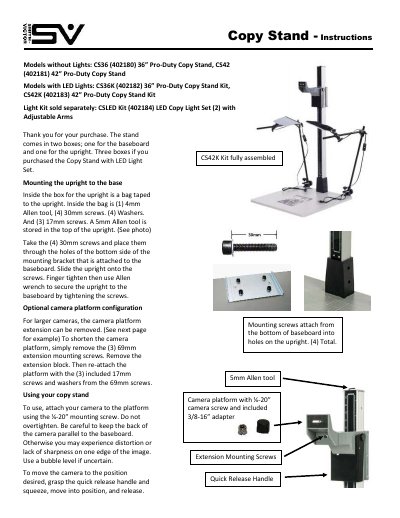
Smith-Victor CS36/CS42 Pro-Duty Copy Stand Instructions cover assembly and use of the 36-inch and 42-inch copy stands, including CS36K/CS42K kits with LED lights and the separately sold CSLED Kit. The document describes mounting the upright to the baseboard, optional camera platform shortening, camera attachment, and adjustment with the quick release handle.
It also lists included hardware such as 30mm, 17mm, 69mm, and 13mm screws, 4mm and 5mm Allen tools, washers, and a 1/4-20 inch camera screw with 3/8-16 inch adapter. A one-year limited factory warranty and liability limitations are included.
Covers: Models without Lights · Models with LED Lights · Light Kit sold separately · Mounting the upright to the base · Optional camera platform configuration · Using your copy stand
Latest Smith-Victor manuals
Smith-Victor CS36/CS42 Pro-Duty Copy Stand Instructions
User Manual 2 pages · 255 KB · ENInstructions for assembling and using Smith-Victor CS36/CS42 Pro-Duty Copy Stands, including LED kit models, camera platform adjustment, and warranty.
Which document do I need?
User Manual
Day-to-day operation, settings and troubleshooting. Start here if the product is already set up.
Questions answered in Smith-Victor manuals
How do I mount the upright to the baseboard?
Place the four 30mm screws through the holes in the bottom side of the mounting bracket attached to the baseboard, slide the upright onto the screws, finger tighten, then tighten with an Allen wrench.
From: Smith-Victor CS36/CS42 Pro-Duty Copy Stand Instructions
How can the camera platform be shortened for larger cameras?
Remove the three 69mm extension mounting screws and the extension block, then reattach the platform with the three included 17mm screws and washers.
From: Smith-Victor CS36/CS42 Pro-Duty Copy Stand Instructions