
Key facts
- Manuals
- 1
- Languages
- EN
- Last added
- 2023-10-26
Featured rollease acmeda manuals
Rollease Acmeda Smart Blinds Google Home Setup Guide
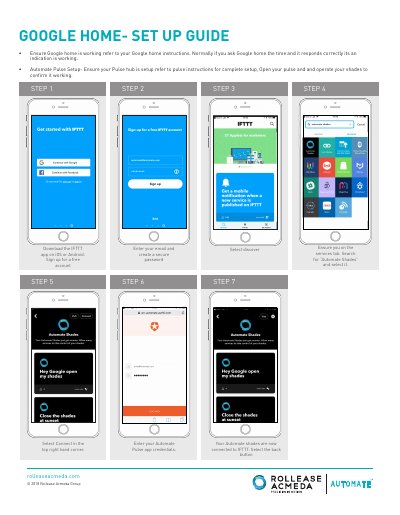
This document provides instructions for setting up Rollease Acmeda smart blinds with Google Home. It begins by verifying that the Google Home device and the Pulse hub are functioning correctly before proceeding with the integration steps.
The guide details the process of linking the Automate Shades service on IFTTT to the user's Google account. It covers creating a new applet, defining a custom voice command, and configuring the specific actions for opening, closing, or positioning the blinds within the Pulse app.
Covers: Google Home Setup · IFTTT App Installation · Automate Pulse Connection · Creating a New Applet · Voice Command Configuration · Configuring Shade Actions
Latest rollease acmeda manuals
Rollease Acmeda Smart Blinds Google Home Setup Guide
User Manual 3 pages · 1.3 MB · ENA step-by-step guide to connecting Rollease Acmeda smart blinds to Google Home using the IFTTT app and Automate Pulse.
Which document do I need?
User Manual
Day-to-day operation, settings and troubleshooting. Start here if the product is already set up.
Questions answered in rollease acmeda manuals
How do I verify if my Google Home is working?
Ask Google Home the time; if it responds correctly, it indicates the device is working.
What app is needed to connect the blinds to Google Home?
You need to download and use the IFTTT app on iOS or Android.