
Key facts
- Manuals
- 1
- Languages
- EN
- Last added
- 2026-11-06
Featured HDI manuals
HDi Series Android 5.1 Multi-touch Screen Quick Start Guide
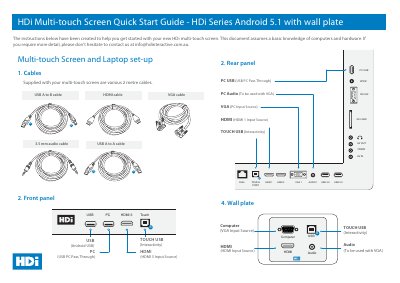
This quick start guide explains how to set up the HDi Series Android 5.1 multi-touch screen with a laptop and wall plate. It identifies the supplied 2 metre cables, front and rear panel connections, and the steps for connecting HDMI or VGA and audio.
The guide also describes the touch USB connection, the OSD controls, touch functions, and shortcuts for accessing inputs, apps, and settings on the Android screen.
Covers: Cables · Front panel · Rear panel · Wall plate · Connecting your multi-touch screen and laptop · Ready to use
Latest HDI manuals
HDi Series Android 5.1 Multi-touch Screen Quick Start Guide
Quick Start Guide 2 pages · 263 KB · ENQuick start guide for the HDi Series Android 5.1 multi-touch screen, covering cable connections, wall plate setup, OSD, and touch functions.
Which document do I need?
Quick Start Guide
The shortest path to a working setup, usually only a few pages.
Questions answered in HDI manuals
What cables are supplied with the HDi multi-touch screen?
It is supplied with various 2 metre cables, including USB A to B, HDMI, VGA, 3.5 mm audio, and USB A to A cables.
From: HDi Series Android 5.1 Multi-touch Screen Quick Start Guide
How do I connect my laptop to the multi-touch screen using HDMI?
Connect the HDMI cable to the wall plate HDMI socket and to your laptop.
From: HDi Series Android 5.1 Multi-touch Screen Quick Start Guide