
Key facts
- Manuals
- 1
- Languages
- EN
- Last added
- 2023-10-27
Featured Dialog Semiconductor manuals
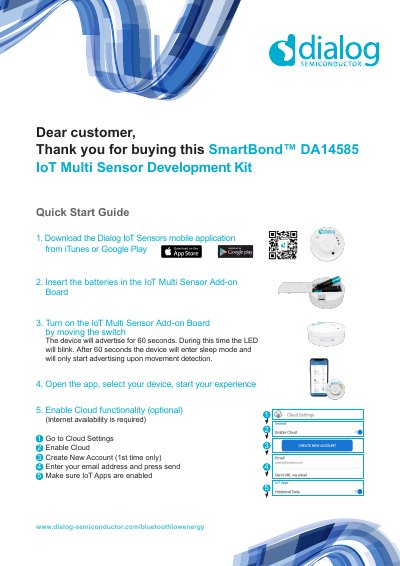
Dialog Semiconductor DA14585 IoT Multi Sensor Development Kit Quick Start Guide
This Quick Start Guide provides instructions for setting up the SmartBond™ DA14585 IoT Multi Sensor Development Kit. Users are directed to download the Dialog IoT Sensors mobile application from iTunes or Google Play. The guide details the physical setup, which involves inserting batteries into the IoT Multi Sensor Add-on Board and activating it via a switch. Once activated, the device advertises for 60 seconds, indicated by a blinking LED, before entering sleep mode.
Covers: Download the Dialog IoT Sensors mobile application · Insert the batteries in the IoT Multi Sensor Add-on Board · Turn on the IoT Multi Sensor Add-on Board · Open the app and select your device · Enable Cloud functionality · Developer information and support portal
Latest Dialog Semiconductor manuals
Dialog Semiconductor DA14585 IoT Multi Sensor Development Kit Quick Start Guide
Quick Start Guide 2 pages · 753 KB · ENThis guide explains how to set up the DA14585 IoT Multi Sensor Development Kit, including battery installation, app pairing, and enabling cloud functionality.
Which document do I need?
Quick Start Guide
The shortest path to a working setup, usually only a few pages.
Questions answered in Dialog Semiconductor manuals
Where can I download the required mobile application?
You can download the Dialog IoT Sensors mobile application from iTunes or Google Play.
From: Dialog Semiconductor DA14585 IoT Multi Sensor Development Kit Quick Start Guide
How long does the device advertise before entering sleep mode?
The device will advertise for 60 seconds after being turned on, during which the LED will blink.
From: Dialog Semiconductor DA14585 IoT Multi Sensor Development Kit Quick Start Guide