
Key facts
- Manuals
- 1
- Languages
- EN
- Last added
- 2023-10-19
Featured CME Medical manuals
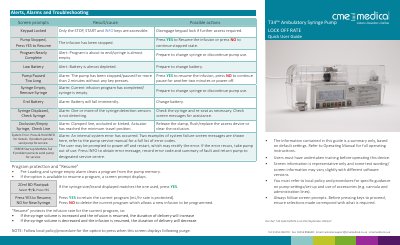
CME Medical T34 Ambulatory Syringe Pump Quick User Guide
This document serves as a troubleshooting summary for the CME Medical T34 Ambulatory Syringe Pump. It lists common screen prompts and alarms, such as 'Keypad Locked', 'Pump Stopped', and 'Syringe Displaced', alongside the specific actions users should take to resolve them. The guide emphasizes that this is a summary based on default settings and refers users to the full Operating Manual for detailed instructions.
Covers: Troubleshooting · Screen prompts · Alarm actions · Program protection · Resume options · Start a New Infusion
Latest CME Medical manuals
CME Medical T34 Ambulatory Syringe Pump Quick User Guide
Other 2 pages · 346 KB · ENA troubleshooting and quick user guide for the CME Medical T34 Ambulatory Syringe Pump, covering alarm causes, actions, and infusion setup.
Questions answered in CME Medical manuals
What should I do if the pump displays a System Error?
Press and hold INFO for details. If the problem persists, send the pump for service.
From: CME Medical T34 Ambulatory Syringe Pump Quick User Guide
What does the 'Program Nearly Complete' alert mean?
It indicates the infusion program is about to end or the syringe is almost empty, requiring preparation to change the syringe.
From: CME Medical T34 Ambulatory Syringe Pump Quick User Guide