
Key facts
- Manuals
- 2
- Languages
- EN
- Last added
- 2026-11-15
Featured ClearView manuals
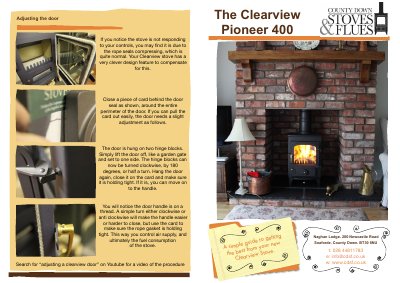
Clearview Pioneer 400 Stove User Manual
The Clearview Pioneer 400 stove door hangs on two hinge blocks that can be turned 180 degrees, and the handle is threaded to make closing easier or harder. A card check around the door seal verifies that the rope gasket is holding tight, which controls air supply and fuel consumption.
Simple operation guidelines cover starting the fire with kindling, using the air-wheel and air-slide, burning logs, turf or coal, raking the fire, overnight burning, and cleaning the glass with damp kitchen paper and wood ash.
Covers: Adjusting the door · Door handle adjustment · Air supply and fuel consumption · Rope seal check · Lighting the stove · Air-wheel and air-slide controls
ClearView Standalone DVR User's Manual
ClearView Standalone DVR User's Manual describes installation, connections, navigation, menu operations, web operation, and maintenance for this embedded Linux DVR series. It covers real-time monitoring, recording, playback, backup, alarm, PTZ, and network functions.
The manual also includes feature and specification information, control panel and remote operation details, auxiliary menus, a professional surveillance system section, FAQ, and appendices for HDD capacity and compatible devices.
Covers: Features and Specifications · Overview and Controls · Installation and Connections · Navigation and Controls · Menu Operations and Controls · Auxiliary Menu
Latest ClearView manuals
Clearview Pioneer 400 Stove User Manual
User Manual 2 pages · 373 KB · ENThis Clearview Pioneer 400 stove user manual covers door adjustment, operation, lighting, fuel control, cleaning and maintenance.
ClearView Standalone DVR User's Manual
User Manual 197 pages · 6.8 MB · ENUser manual for the ClearView standalone DVR covering installation, controls, menus, recording, playback, and network operation.
Which document do I need?
User Manual
Day-to-day operation, settings and troubleshooting. Start here if the product is already set up.
Questions answered in ClearView manuals
How do I adjust the door on the Clearview Pioneer 400?
Lift the door off, turn the hinge blocks 180 degrees, rehang it, and check that the rope gasket holds tight using a card.
How do I control the burn rate on the Clearview Pioneer 400?
Close the air-wheel and use the air-slide to control the rate at which the fire burns.
What operating system does the DVR use?
It uses embedded Linux OS.
What compression formats does it support?
It uses H.264 video compression and G.711 audio compression.