
Key facts
- Manuals
- 2
- Languages
- EN
- Last added
- 2023-10-19
Featured BroadNet manuals
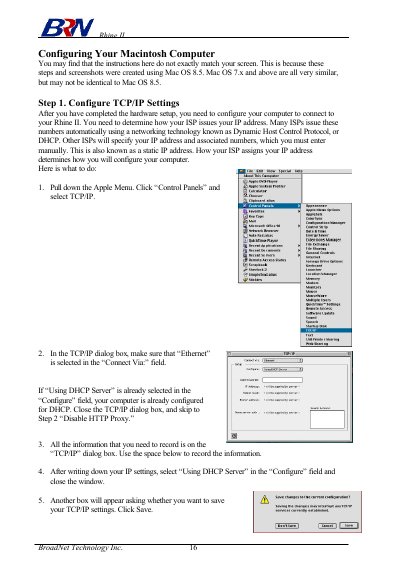
BroadNet Rhine II Router Configuration Guide
This guide explains how to configure a Macintosh computer to connect to the BroadNet Rhine II router. It covers setting TCP/IP parameters, disabling HTTP proxies in web browsers, and obtaining IP settings from the router. The document also details how to access the router's web interface for initial setup.
Covers: Configuring TCP/IP Settings · Disabling HTTP Proxy · Obtaining IP Settings · Configuring Rhine II Quick Setup · Basic Configuration · Password Settings
BroadNet Rhine II 10/100 Mbps Broadband Router User's Manual
This manual provides instructions for setting up and configuring the BroadNet Rhine II 10/100 Mbps Broadband Router. It includes hardware setup, LED status definitions, and computer configuration steps for various operating systems including Windows 95/98/ME, Windows 2000, Windows NT 4.0, and Macintosh OS 7.x.
Covers: Congratulations on your purchase · This Package Contains · Confirm That You Meet Installation Requirements · Hardware Setup · Indicator LEDs · Configuring Your Computer
Latest BroadNet manuals
BroadNet Rhine II Router Configuration Guide
User Manual 18 pages · 1.6 MB · ENInstructions for configuring TCP/IP settings on a Macintosh computer and setting up the BroadNet Rhine II router for LAN and WAN connections.
BroadNet Rhine II 10/100 Mbps Broadband Router User's Manual
User Manual 19 pages · 854 KB · ENUser's Manual for the BroadNet Rhine II 10/100 Mbps Broadband Router, covering installation, configuration, and advanced settings.
Which document do I need?
User Manual
Day-to-day operation, settings and troubleshooting. Start here if the product is already set up.
Questions answered in BroadNet manuals
What is the default password for the Rhine II router?
There is no password by default.
How do I access the Rhine II configuration page?
Type http://192.168.0.1 in the browser address field and press ENTER.
How do I connect a cable or DSL modem?
Connect your Cable or DSL modem to the WAN port on the rear panel of the router.
From: BroadNet Rhine II 10/100 Mbps Broadband Router User's Manual
What is the Rhine II?
The Rhine II is a broadband router designed to share Internet access, provide security, and network multiple devices.
From: BroadNet Rhine II 10/100 Mbps Broadband Router User's Manual