
Key facts
- Manuals
- 1
- Languages
- EN
- Last added
- 2026-10-20
Featured Akw manuals
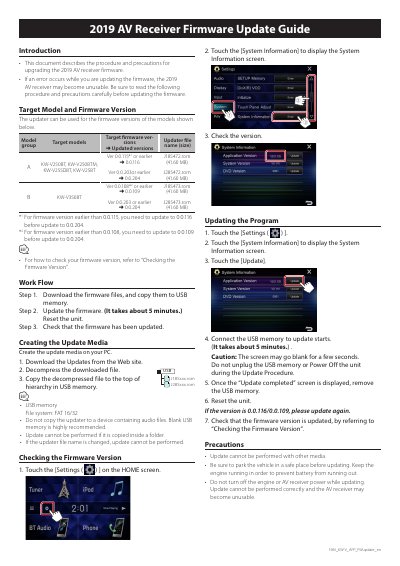
AKW 2019 AV Receiver Firmware Update Guide
This document describes the procedure and precautions for upgrading the firmware of selected 2019 AV receivers. It covers downloading files, creating update media, checking current versions, and performing the update process safely.
The guide details specific target models including the KW-V250BT series and KW-V350BT, along with their corresponding firmware version requirements and file names. Users are instructed to use a blank USB memory formatted in FAT 16/32 to copy the decompressed updater files before initiating the update via the unit's System Information menu.
Covers: Introduction · Target Model and Firmware Version · Work Flow · Creating the Update Media · Checking the Firmware Version · Updating the Program
Latest Akw manuals
AKW 2019 AV Receiver Firmware Update Guide
User Manual 1 pages · 401 KB · ENThis guide provides the procedure and precautions for upgrading firmware on specific AKW 2019 AV receiver models using a USB memory device.
Which document do I need?
User Manual
Day-to-day operation, settings and troubleshooting. Start here if the product is already set up.
Questions answered in Akw manuals
What is the minimum USB memory file system required for the update?
The USB memory must use the FAT 16/32 file system.
How long does the firmware update process take?
The update procedure takes about 5 minutes.