
Key facts
- Manuals
- 2
- Languages
- EN
- Last added
- 2026-10-16
Featured Advanced Bionics manuals
Advanced Bionics Marvel CI Upgrade Programming Guide
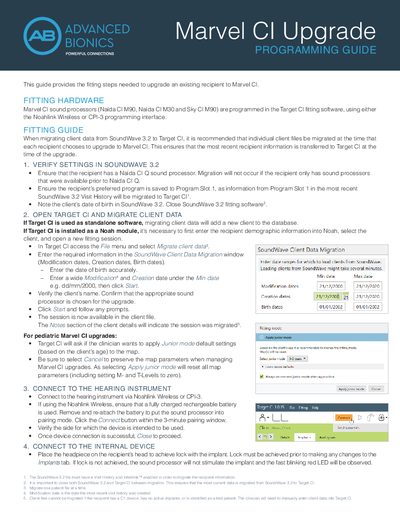
This document provides the fitting steps required to upgrade an existing recipient to the Marvel CI sound processor. It covers the necessary hardware connections using the Noahlink Wireless or CPI-3 interface and the software workflow for migrating client data from SoundWave 3.2 to Target CI. Special attention is given to pediatric upgrades and bilateral recipients upgrading only one side.
Covers: Fitting Hardware · Verify Settings in SoundWave 3.2 · Open Target CI and Migrate Client Data · Connect to the Hearing Instrument · Connect to the Internal Device · Measure Impedances and NRI

Advanced Bionics Auria Harmony Sound Processor User Guide
The Auria Harmony Sound Processor is a component of the Advanced Bionics cochlear implant system. It captures sound via a microphone, converts it into a digital code, and transmits it to the implant via a headpiece. The device allows for various wearing options and is compatible with specific Auria accessories like earhooks and PowerCel batteries.
The guide details how to assemble the processor with its headpiece and color covers, how to power it using PowerCel batteries or the charger, and how to adjust volume and programs. It also provides instructions for connecting to external audio sources such as telephones, FM systems, and infrared receivers, as well as troubleshooting common issues like no sound or charging problems.
Covers: Assembling Your Auria Harmony Sound Processor · Powering Your Harmony Processor · Using Your Harmony Processor · Hearing with Your Harmony Processor · Other Accessories · Troubleshooting
Latest Advanced Bionics manuals
Advanced Bionics Marvel CI Upgrade Programming Guide
User Manual 2 pages · 244 KB · ENThis guide details the steps to upgrade Naída CI M90, M30, and Sky CI M90 hearing instruments from SoundWave 3.2 to Target CI, including data migration and…
Advanced Bionics Auria Harmony Sound Processor User Guide
User Manual 54 pages · 2.8 MB · ENThis user guide covers the assembly, powering, operation, and troubleshooting of the Advanced Bionics Auria Harmony Sound Processor for cochlear implant users.
Which document do I need?
User Manual
Day-to-day operation, settings and troubleshooting. Start here if the product is already set up.
Questions answered in Advanced Bionics manuals
What happens if the recipient has a C1 device or is a test patient?
Client files cannot be migrated for these recipients, and the clinician must manually enter client data into Target CI.
How should pediatric Marvel CI upgrades be handled regarding Junior mode?
Clinicians should select Cancel when asked to apply Junior mode default settings to preserve existing map parameters.
How do I attach the Accent Color Headpiece Cap?
Align the color cap with your headpiece and gently place the color cap onto the headpiece as they are magnetically attracted.
From: Advanced Bionics Auria Harmony Sound Processor User Guide
What does a red light on the PowerCel Charger indicate?
A red light indicates a potential fault with the PowerCel, and you should contact your audiologist if it persists after 90 minutes of charging.
From: Advanced Bionics Auria Harmony Sound Processor User Guide