
Key facts
- Manuals
- 15
- Categories
- 2
- Languages
- ZH · EN · JA
- Last added
- 2026-10-03
Featured Titan manuals

Titan 2018 User Manual
Titan is a graphical workflow‑script configuration tool designed for automotive electronic testing. The manual introduces its main features, such as support for various workflow statements, diagnostic service exchange, and bus message handling.
The guide walks users through starting the software, creating and editing test cases, adding variables and services, and exporting or importing cases. Detailed sections cover the menu bar, function windows, process statements, and message handling. This manual is written in Chinese.
Covers: Introduction · Starting the Software · Quick Start · Feature Overview · Process Statements · Messages
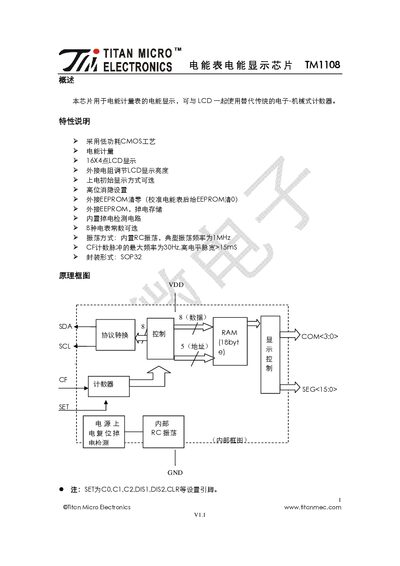
Titan TM1108 Energy Meter Display Chip Datasheet
The TM1108 is a low‑power CMOS chip designed for energy‑meter displays, driving a 16×4 LCD and supporting external EEPROM for calibration and data retention. It offers selectable meter constants, brightness control via an external resistor, and various power‑on display options.
The document provides pin descriptions, configuration settings, typical application circuits with EEPROM and LCD, and extensive electrical, switching, and timing parameters. It also lists package information and revision history. This manual is written in Chinese.
Covers: Overview · Features · Pin Arrangement and Description · Setting Description · Application Circuit · Electrical Parameters
Titan PCIe -400 Serial I/O Card User Manual
The PCIe -400 and PCIe -400LP are plug‑and‑play 4‑port RS‑232 serial I/O expansion cards for PCI Express. They use the EXAR XR17V354 UART chip and support data rates up to 921.6 kbps, with 256‑byte FIFO buffers on each port.
The manual includes a full feature list, technical specifications, pin‑out diagrams for DB9 and DB44 connectors, step‑by‑step Windows driver installation, and instructions for uninstalling the drivers.
Covers: Introduction · Features · Specifications · Pin‑out Information · Installation · Uninstalling Windows Drivers
Titan TTB775VAC Vacuum Cleaner User Manual
This manual covers all essential information for safely using the Titan TTB775VAC wet/dry vacuum cleaner. It includes safety warnings, preparation steps, and detailed operating instructions to help users achieve optimal performance.
Additional sections describe care and maintenance, troubleshooting common issues, and proper recycling and disposal of the unit and its accessories.
Covers: Getting started · Safety information · Technical specifications · Product functions · Operation · Care and maintenance
Latest Titan manuals
Titan 2018 User Manual
User Manual 52 pages · 2.3 MB · ZHThe Titan 2018 User Manual explains how to use the graphical workflow script configuration tool for automotive electronic test processes.
Titan TM1108 Energy Meter Display Chip Datasheet
Datasheet 9 pages · 301 KB · ZHThe Titan TM1108 datasheet details features, pinout, settings, application circuits, and electrical specifications for the energy‑meter display chip.
Titan PCIe -400 Serial I/O Card User Manual
User Manual 15 pages · 1.4 MB · ENThe Titan PCIe -400 User Manual provides specifications, pin‑out details, and Windows driver installation instructions for the 4‑port serial I/O cards.
Titan TTB775VAC Vacuum Cleaner User Manual
User Manual 36 pages · 6 MB · ENThe Titan TTB775VAC vacuum cleaner user manual provides safety guidelines, setup, operation, maintenance, troubleshooting, and disposal instructions.
TITAN XG-500 Projector user manual
The TITAN XG-500 is a high brightness digital video projector with a 4:3 widescreen display. This product complies with the EU directives on electromagnetic compatibility and low voltage equipment. It has undergone relevant standard tests. It is suitable for large screen video projection.
TITAN WUXGA 3D Dual 3D 330 660 digital Projector user manual
This document describes the features and characteristics of the Digital Projection TITAN WUXGA series high brightness digital video projectors, including TITAN WUXGA 3D, Dual 3D, 330, and 660 models, which have a 16:10 widescreen display.
TITAN 1080p-500 1080p-250 digital Projector user manual
This is a user manual for a 1080p-500, 1080p-250 high brightness digital video projector
TITAN 3D Displays user guide
Titan 3D Displays Quick Start Guide
TITAN 1080p 3D Dual 3D TITAN 1080p 3D Dual 3D Ultra Contrast TITAN Dual Fastframe High Brightness Digital Video Projector 16:9 widescreen display User Manual user manual
This document is a user manual and declaration of conformity for the Digital Projection TITAN series 1080p 3D and Dual 3D video projectors. The projectors feature high definition, 3D capability, and high contrast.
TITAN 1080p-600 Reference 1080p TITAN 1080p-700 1080p Ultra Contrast High Brightness Digital Video Projector 16:9 widescreen display User Manual
This document is the user manual for the TITAN 1080p-600/700, Reference, Ultra Contrast projector.
Titan RPM Vertical Grid D.E. Filter Owner's Manual
This manual contains information on installation, operation and troubleshooting of the Titan RPM™ Vertical Grid D.E. Filter.
TITAN OPTO LEDs Surface Mount OPTOELECTRONICS
This is a product catalogue, which contains a series of surface mount LEDs. It has normal brightness and high brightness, and it is available in red, orange, yellow and green. The size is 1.6x0.8, 2.0x1.25, 1.0x0.8 and 1.4x0.8.
Titan TM1723 LCD Driver Control Manual
User Manual 20 pages · 608 KB · JAThe Titan TM1723 LCD driver manual provides pin definitions, register settings, and operation modes for the TM1723 controller.
TITAN MICRO ELECTRONICS TM1638 LED drive control private Electricity Road Manual
Titan X400/X401 Elevator Microcontroller User Manual
User Manual 63 pages · 955 KB · ZHThe Titan X400/X401 elevator microcontroller user manual provides installation, wiring, configuration, and troubleshooting instructions.
Which document do I need?
User Manual
Day-to-day operation, settings and troubleshooting. Start here if the product is already set up.
Datasheet
Ratings, dimensions and ordering codes, for selection and design work.
Questions answered in Titan manuals
How do I export a test case?
Right‑click the test case, choose “导出”, and it will be saved as a “.TTC” file.
From: Titan 2018 User Manual
How is LCD brightness adjusted?
Brightness is set by connecting a pull‑up resistor to the VLCD pin; the pin includes an internal 60 kΩ pull‑down.
How can the display be cleared to zero?
Pull the CLR pin low (connect to GND) for a few tens of microseconds; the chip will reset all data to zero.
How many RS‑232 ports does the PCIe -400 provide?
The PCIe -400 provides four RS‑232 ports.
What is the first step to install the Windows driver for the PCIe -400?
Switch off the computer and insert the PCI Express industrial serial I/O card into a free PCI Express bus slot.