
Key facts
- Manuals
- 8
- Models
- 1
- Categories
- 3
- Languages
- EL · ZH · EN
- Last added
- 2026-10-03
Skyworth models by category
Featured Skyworth manuals
Skyworth E3A11G LED TV Quick Start Guide
This guide provides an overview of the accessories supplied with the Skyworth E3A11G LED TV and the basic specifications for each screen size. It includes safety warnings, recommended clearances for ventilation, and environmental operating limits.
The document explains how to install the TV on a stable surface or wall‑mount, describes the remote‑control layout, details the e‑Manual access, and offers a troubleshooting section for common issues such as remote problems, picture/audio errors, and network connectivity.
Covers: Accessories · Specifications · Installation · Remote control functions · e‑Manual access · Troubleshooting
Skyworth 32E309R TV Service Manual
This service manual provides detailed information for repairing the Skyworth 32E309R LCD television. It covers safety precautions, basic environmental specifications, and step‑by‑step operating instructions.
The document also includes fault‑handling procedures, disassembly diagrams, factory‑mode adjustments, electrical block diagrams, circuit diagrams and a complete bill of materials to assist service technicians. This manual is written in Chinese.
Covers: LCD TV Precautions · Basic Specifications · Operation Instructions and Adjustments · Connection Introduction · Fault Handling Procedure · Disassembly Diagram
Skyworth 32E200E LCD TV Service Manual
This service manual provides detailed information for repairing the Skyworth 32E200E LCD television. It includes an introduction, safety precautions, basic specifications, operation instructions, panel characteristics, fault handling procedures, factory mode adjustments, circuit diagrams, and a bill of materials.
Technicians can use the included diagrams, part numbers, and step‑by‑step procedures to diagnose issues, replace components such as the LED backlight, and perform factory‑mode calibrations safely. This manual is written in Chinese.
Covers: LCD TV and Precautions · Basic Specifications · Operation Instructions and Adjustments · Panel Characteristics · Fault Handling Process · Factory Mode Adjustment
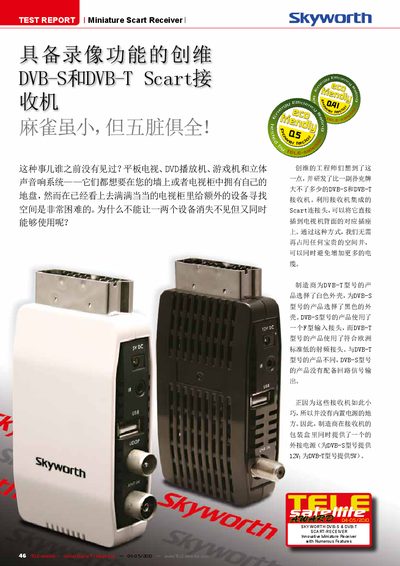
Skyworth Mini Box DVBTM0001 / DVBSM0001 Test Report
The Skyworth Mini Box is a compact SCART‑connected receiver with PVR functionality, offered in two versions: DVBTM0001 (DVB‑T) with a white case and 5 V external power, and DVBSM0001 (DVB‑S) with a black case and 12 V external power. Both models support PAL and NTSC, provide composite, RGB and S‑Video outputs, and include a USB port for external storage and recording.
The report details menu navigation, satellite and terrestrial channel scanning modes (standard, NIT and blind scan), DiSEqC motor control, and multimedia features such as music playback, picture viewer and built‑in games. Power‑saving functions automatically switch the unit to standby after three hours of inactivity.
Covers: Product Overview · Installation · Menu Navigation · Channel Scanning · DiSEqC & Satellite Settings · Multimedia & Recording
Latest Skyworth manuals
Skyworth E3A11G LED TV Quick Start Guide
Quick Start Guide 40 pages · 3.4 MB · ELQuick start guide for the Skyworth E3A11G LED TV covering accessories, installation, remote functions and troubleshooting.
Skyworth 32E309R TV Service Manual
Service Manual 84 pages · 3.6 MB · ZHRepair manual for the Skyworth 32E309R LCD TV with safety notes, specifications, operation guide, fault handling and schematics.
Skyworth 32E200E LCD TV Service Manual
Service Manual 54 pages · 2.8 MB · ZHRepair reference for the Skyworth 32E200E LCD TV, covering specifications, operation, troubleshooting, and parts.
Skyworth Mini Box DVBTM0001 / DVBSM0001 Test Report
Product Leaflet 5 pages · 704 KB · ENA test report describing the features, installation, operation and specifications of Skyworth Mini Box DVB‑S and DVB‑T miniature SCART receivers.
Skyworth DVBTM0001/DVBSM0001 Scart Receiver Test Report
Product Leaflet 5 pages · 687 KB · ENThe Skyworth DVBTM0001 and DVBSM0001 miniature SCART receivers are reviewed with features, specifications, and performance details.
SKYWORTH 43AAHV plasma Television Manual
User Manual 26 pages · 2.4 MB · ZHThe LG 43PAAHV plasma TV user manual provides setup, operation, safety, and troubleshooting instructions.
Skyworth CG08 GSM/CDMA 1X Double Mold digital mobile telephone User Manual
Skyworth Q86 Phone User Manual
User Manual 32 pages · 557 KB · ZHThe Skyworth Q86 phone user manual provides safety precautions, hardware overview, setup steps, menu navigation, and troubleshooting guidance.
Which document do I need?
Quick Start Guide
The shortest path to a working setup, usually only a few pages.
Service Manual
Disassembly, diagnostics and part numbers, for repair.
User Manual
Day-to-day operation, settings and troubleshooting. Start here if the product is already set up.
Questions answered in Skyworth manuals
How do I turn the TV on or off?
Press the POWER button on the remote control to toggle the TV power.
How do I turn the TV on?
Press the power key on the remote control or the channel‑selection key on the control panel.
How long does it take for the picture to appear after turning on the TV?
The TV uses a soft‑start method and needs about 15–30 seconds before the image appears.
What batteries does the remote control use?
The remote uses two AA (七号) batteries, installed with correct polarity marked (+) and (‑) on the remote housing.
How long does it take for the picture to appear after powering on?
The TV uses a soft‑start method and typically requires 15–30 seconds before the image is displayed.
What external power supplies are required for the DVB‑S and DVB‑T models?
The DVB‑S model uses a 12 V external power supply, while the DVB‑T model uses a 5 V external power supply.