
Key facts
- Manuals
- 10
- Languages
- EN
- Last added
- 2022-09-03
Featured Integral manuals
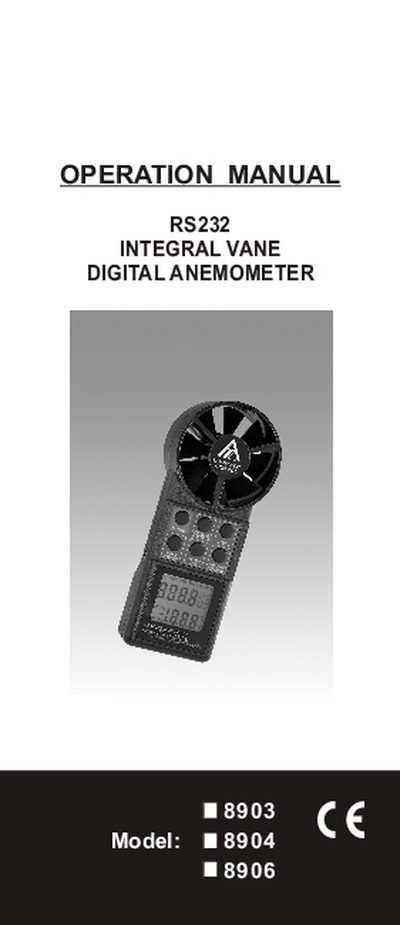
Integral 8903/8904/8906 Vane Anemometer User Manual
This operation manual covers the Integral Vane Anemometer models 8903, 8904 and 8906. It explains how to measure air velocity, airflow volume, and temperature, and describes the various measurement modes such as single‑point, continuous moving average, and multi‑point averaging. The manual also details the keypad functions, display indicators, and how to use the RS232 interface for data logging.
Additional sections describe how to change default units, enable non‑sleep mode, configure the RS232 output format, and perform basic maintenance. Warranty information, return authorization procedures, and compliance certifications are also included.
Covers: Measuring Air Velocity · Continuous Moving Average · MIN/MAX/AVG Reading · Multi‑Point Averaging · Non‑Sleep Mode · Changing Default Units
Integral 8903/8904/8906 Vane Anemometer Operation Manual
This operation manual explains how to install, power on, and use the Integral 8903/8904/8906 Vane Anemometer. It covers single‑point and multi‑point air‑velocity measurements, continuous moving average, MIN/MAX/AVG functions, and how to switch between imperial and metric units.
The guide also details the RS232 communication settings, connection procedures, battery life, warranty information, and return authorization process. Safety cautions and unit specifications are included to help technicians and HVAC technicians obtain accurate airflow data.
Covers: Features · Measurement Modes · Unit Selection · Non Sleep Mode · RS232 Interface · Specifications
Integral 8903/8904/8906 Vane Anemometer Operation Manual
This operation manual explains how to use the Integral 8903/8904/8906 Vane Anemometer for measuring air velocity, airflow volume, and temperature in residential and commercial HVAC applications. It describes the keypad functions, measurement modes (single‑point, continuous moving average, multi‑point, min/max/avg), and how to switch between imperial and metric units.
The manual also covers the RS232 interface for data logging, power‑off behavior, battery life, warranty information, and detailed technical specifications such as display size, measurement range, accuracy, and dimensions.
Covers: Operation Overview · Measuring Air Velocity · Continuous Moving Average · Min/Max/Avg Recording · Multi‑Point Measurement · Non‑Sleep Mode
Latest Integral manuals
Integral 8903/8904/8906 Vane Anemometer User Manual
User Manual 19 pages · 640 KB · ENThe Integral 8903/8904/8906 Vane Anemometer user manual provides operation instructions, measurement modes, RS232 setup, and technical specifications.
Integral 8903/8904/8906 Vane Anemometer Operation Manual
User Manual 19 pages · 640 KB · ENThe Integral 8903/8904/8906 Vane Anemometer operation manual provides setup, measurement modes, RS232 interface, and maintenance instructions.
Integral 8903/8904/8906 Vane Anemometer Operation Manual
User Manual 19 pages · 640 KB · ENThe Integral 8903/8904/8906 Vane Anemometer operation manual provides usage instructions, measurement modes, RS232 setup, and technical specifications.
INTEGRAL HYDRAULIK W4A-6M012-DC24/2 technology data
INTEGRAL IN74HC21A handbook
INTEGRAL IN74LV623 Data Sheet
IN74LV623 is an 8-way 3-state non-inverting bus transceiver, compatible with 74HC623A, 74HCT623A series microcircuits, input voltage range is 1.2-3.6V, working temperature range is -40-125℃.
INTEGRAL IW4069UB DATA SHEET
The IW4069UB 1 HEX INVERTER is a high-voltage silicon-gate CMOS device that consists of six inverter circuits and is intended for all general-purpose inverter applications where the medium-power TTL-drive and logic-level-conversion capabilities of circuits such as the IW4049UB Hex Inverter/Buffers are not required.
INTEGRAL IW4516B Presettable Up/Down Counter High-Voltage Silicon-Gate CMOS
IW4516B Presettable Binary Up/Down Counter is a high-performance counter with high-voltage silicon-gate CMOS.
INTEGRAL IN74HC4051 handbook
IN74HC4051 is a high-performance silicon-gate CMOS switch array, introduced by Infineon. This product features fast propagation delays, low on-resistances, and low off-leakage currents. These switches control analog voltages that may vary across the complete power supply range (from VCC to VEE). The channel-select inputs determine which one of the analog inputs/outputs is to be connected, by means of an analog switch, to the common output/input. When the enable pin is high, all analog switches are turned off. The channel-select and enable inputs are compatible with standard CMOS outputs; with pull-up resistors, they are compatible with LS/ALSTTL outputs.
INTEGRAL HYDRAULIK-NG 6 technology data(German)
This is a PDF document which mainly introduces the performance parameters, usage methods and other information of the 40-501-09/01 model of the pneumatic electric valve of the German H company.
Which document do I need?
User Manual
Day-to-day operation, settings and troubleshooting. Start here if the product is already set up.
Questions answered in Integral manuals
How do I enable non‑sleep mode on the anemometer?
Press the ON button and HOLD key at the same time, then release the ON button; an "n" will appear on the LCD indicating non‑sleep mode.
How can I change the measurement units from imperial to metric?
Press the HOLD key while the unit is on; the LCD will change to display metric units (m/s, °C).
How can I enable non‑sleep mode?
Turn the unit off, then press ON and HOLD together, release ON; an "n" appears on the LCD indicating non‑sleep mode is active.
From: Integral 8903/8904/8906 Vane Anemometer Operation Manual
What is the RS232 output format?
The meter outputs data as "TXXX.XF, VXXXXF" for velocity and "TXXX.XC, VXXXXM" for temperature.
From: Integral 8903/8904/8906 Vane Anemometer Operation Manual
How do I change the measurement units from imperial to metric?
Press the HOLD key; the LCD will change to display metric units such as "m/s, C".
From: Integral 8903/8904/8906 Vane Anemometer Operation Manual
How can I enable non‑sleep (continuous on) mode?
Press the ON button and the HOLD button at the same time, then release the ON button; an "n" will appear on the LCD indicating non‑sleep mode.
From: Integral 8903/8904/8906 Vane Anemometer Operation Manual