
Key facts
- Manuals
- 31
- Languages
- EN · NL · ZH
- Last added
- 2012-05-07
Featured Honeywell manuals
Honeywell ST3000 Smart Pressure Transmitter Quick Start Installation Guide
The Quick Start Installation Guide explains how to install the ST3000 smart pressure transmitter safely and correctly. It includes safety symbols, warranty information, and references to additional Honeywell documentation.
Key sections cover mounting methods (bracket, flange, flush, high‑temperature, remote seal), trimming procedures, jumper settings, wiring connections, power‑up steps, and certification details. An addendum describes the optional write‑protect jumper and its installation without removing the printed wiring assembly.
Covers: Mounting the Transmitter · Trim the Transmitter · Set the Jumpers · Connect the Wiring and Power Up · Certifications · Symbol Definitions

Honewell MHML87D92DE0908 ENGLISH Operation Installation Guide
The Operation & Installation Guide introduces the Honeywell Waterproof Fire Theft Safe, describing its fire‑resistant construction and the items included with each safe. It explains how to identify the safe, install batteries, and perform the first‑time activation.
Key sections cover testing the electronic lock, programming a personal passcode, using the emergency override key, replacing batteries, and routine care. Warranty information and customer‑service contact details are also provided.
Covers: Safe Identification Record · Overview of Your Safe · Opening Safe for the First Time · Test Locking System · Programming a Personal Passcode · Emergency Override Key / Battery Replacement

Honeywell Intrusion Security Product Guide 2007
This guide introduces Honeywell's full range of intrusion security solutions, from consumer‑grade alarm panels to complex commercial systems. It is aimed at dealers, installers and system integrators who need technical and commercial information about the product families such as Galaxy, Vista, LYNX, Domonial and more.
The catalogue includes detailed specifications for each central panel, key accessories like Keyprox kits, and contact information for Honeywell Security & Custom Electronics offices worldwide. It also provides an alphabetical index for quick reference to part numbers and model codes. This manual is written in Dutch.
Covers: Inbraakcentrales en speciale randapparatuur · Draadloze Producten · Alarmering · Documentatie · Alfabetische index · Galaxy G2 specifications
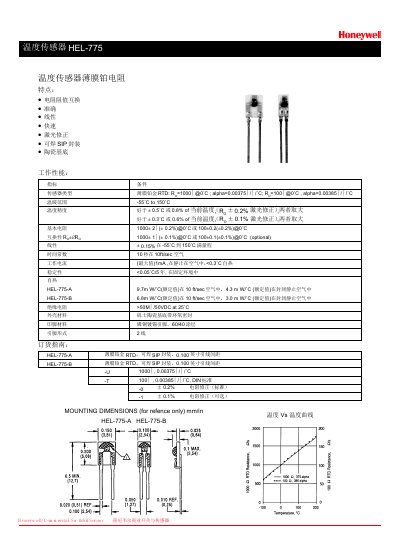
Honeywell HEL-775-A/B Temperature Sensor Datasheet
The HEL-775 series are thin‑film platinum RTD (RTD) temperature sensors offered in two variants, A and B. They feature interchangeable resistance values, high accuracy, linear response, fast response time, laser‑trimmed correction, solder‑able SIP packaging, and a ceramic substrate.
Performance specifications include a temperature range of -55 °C to 150 °C, accuracy better than ±0.5 °C (0.8 % of reading) for the A version and ±0.3 °C (0.6 % of reading) for the B version, resistance of 1000 Ω (A) or 100 Ω (B) at 0 °C with tight tolerance, low self‑heat (<0.3 °C), and high insulation resistance (>50 MΩ at 25 °C). The sensors are supplied in a solderable SIP package with 0.100 in lead spacing. This manual is written in Chinese.
Covers: Features · Performance Specifications · Technical Data · Mounting Dimensions · Ordering Information
Latest Honeywell manuals
Honewell F116 Series 2 Self-Contained Ductable Commercial Air Cleaner handbook
The Honeywell F116 Series 2 Self-Contained Ductable Commercial Air Cleaner is a media air cleaner that uses a three-speed direct drive forward curve blower/motor with a variety of filter combinations to remove airborne contaminants. The air cleaner is designed to provide its own air circulation and can accommodate ducting for intake and/or outlet as needed. It is suitable for collecting smoke, bacteria and viruses, gases, odors and volatile organic compounds (VOCs), fine sawdust, paper dust, brazing, normal atmospheric dusts such as pollens, allergens, dust mites and soot, and virtually any other respirable airborne contaminant.
Honewell UDC3200 Universal Digital Controller Operator Manual
This manual provides operating instructions for the UDC3200 Universal Digital Controller
Honewell HW1000i HW2000i Inverter Generator owner's Manual
The manual introduces the operation and maintenance of the HW2000i inverter generator
Honewell ADEMCO VISTA-48A ADEMCO VISTA-48E Security Systems User Guide
This user guide introduces the basic features and operation methods of ADEMCO VISTA-48A ADEMCO VISTA-48E security system.
Honewell DR4300 Circular Chart Recorder Product Manual
DR4300 Circular Chart Recorder Product Manual
Honewell Excel 500/600 CONTROL SYSTEM handbook
This manual describes the installation instructions for the Excel 5000 open system.
Honewell 18150 Series Air Cleaners owner's Manual
Honewell UDC 2300 Universal Digital Controller Product Manual handbook
This document provides descriptions and procedures for the Installation, Configuration, Operation, and Troubleshooting of your UDC 2300 Controller
Honewell MDA Scientific Midas Toxic Flammable And Oxygen Gas Detector Quick Start Guide
This document provides installation, setup, and operation information for the MDA Scientific Midas toxic, flammable, and oxygen gas detector. The detector is capable of detecting a wide range of toxic, flammable, and oxygen gases used or generated in the semiconductor manufacturing industry and other manufacturing industries.
Honewell 7800 SERIES EC7895A RM7895A Relay Module handbook
EC7895A and RM7895 are microprocessor-based integrated burner controls for automatically fired gas, oil, or combination fuel single burner applications. They feature safety functions, high reliability, application flexibility, communication interface capability, etc.
Honeywell ST3000 Smart Pressure Transmitter Quick Start Installation Guide
Installation Guide 29 pages · 1.2 MB · ENThis Honeywell guide provides quick installation steps, mounting options, wiring, and safety information for the ST3000 smart pressure transmitter.
Honewell MS4980 Area Imaging Scanner Installation User's Guide
This manual introduces the installation and use of MS4980 Area Imaging Scanner, including product overview, base kit, optional accessories, scanner components and more.
Honewell Excel 50 MMI USER GUIDE
Excel 50 MMI User Guide, introduces the basic functions and usage of Excel 50 MMI.
Honewell 620 WinLoader Version 5.4 User Manual
Introduces the overview, usage methods, hardware characteristics and other contents of 620 WinLoader software
Honewell 3820 3820i 4820 4820i Cordless Imaging Systems Quick Start Guide
This document provides a quick start guide for the 3820, 3820i, 4820, and 4820i Cordless Imaging Systems, including instructions on connecting the base, using different connection methods, reading techniques, and default settings of the products.
- 1
- 2
Which document do I need?
Installation Guide
Mounting, wiring and first power-up. Read it before the hardware goes in.
User Manual
Day-to-day operation, settings and troubleshooting. Start here if the product is already set up.
Datasheet
Ratings, dimensions and ordering codes, for selection and design work.
Questions answered in Honeywell manuals
How do I change the default failsafe direction on the ST3000 transmitter?
Use the jumper settings described in Section 3.1 “Changing Default Failsafe Direction”.
From: Honeywell ST3000 Smart Pressure Transmitter Quick Start Installation Guide
How can I set the optional write‑protect jumper?
Follow the steps in the addendum: place the transmitter on a bench, remove power, open the end‑cap, locate the jumper, and position it for read‑only or read/write.
From: Honeywell ST3000 Smart Pressure Transmitter Quick Start Installation Guide
How do I replace the batteries in the safe?
Open the battery compartment cover inside the safe, remove the four AA batteries, dispose of them, and install four new AA batteries in the correct orientation before closing the cover.
From: Honewell MHML87D92DE0908 ENGLISH Operation Installation Guide
What is the factory preset passcode and should I change it?
The factory preset passcode is 159; you should change it immediately to a personal 3‑8 digit passcode for security.
From: Honewell MHML87D92DE0908 ENGLISH Operation Installation Guide
Does the Galaxy G2 series meet EN50131‑1 standards?
Yes, the Galaxy G2 series complies with EN50131‑1 Grade 2.
What communication bus is used by the Galaxy G2 panels?
The panels use a RS485 bus with ECP support.