
Key facts
- Manuals
- 17
- Models
- 2
- Languages
- EN
- Last added
- 2012-07-06
DiGiCo models by category
Featured DiGiCo manuals
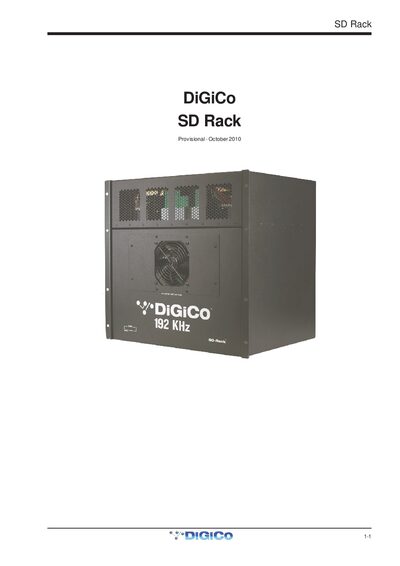
DiGiCo SD Rack 1-1 User Manual
The DiGiCo SD Rack 1-1 is a modular I/O rack designed for use with DiGiCo consoles, offering dual redundant hot‑swappable power supplies and flexible clocking options.
The manual covers power supply operation, clock sources, available I/O cards, split and gain‑tracking functions, and detailed menu‑system navigation for configuring sync source, sample rate, routing mode, Optocore settings and more.
Covers: Product Overview · Power · Clocking · Cards · Splits & Gain Tracking · Menu System
Latest DiGiCo manuals
DiGiCo Waves Operation
This document is a guide to DiGiCo Waves operation, providing information about the use and features of DiGiCo Waves MultiRack SoundGrid Outboard Processing Host for Live Applications. It includes instructions on connecting the console to the SoundGrid network, setting preferences and Waves I/O, inserting racks into channels, adding plugins for sound processing, snapshots, creating processing groups, and saving and recalling configurations.
DiGiCo SD Rack 1-1 User Manual
User Manual 11 pages · 615 KB · ENThe DiGiCo SD Rack 1-1 user manual explains power, clocking, card options, splits, gain tracking, and menu system operation.
DiGiCo Optocore V221 Manual
This document introduces the use of DiGiCo Optocore V221, including system overview, audio IO panel, audio sync, port list, port management and SD rack splits
DiGiCo SD8 user manual
The SD8 Operation Manual introduces the features and characteristics of the SD8 product, including software versions, copyright information, and repair and maintenance
DiGiCo SD8 Manual
DiGiCo SD7 user manual
This document is the SD7 operation manual, which introduces the usage and precautions of the SD7 with software versions 1.1.80+. The document includes copyright information, software license notice, and trademarks.
DiGiCo SD7 Manual
This document describes the new features added to SD7 software versions 1.6.131+ (Mach 2), including new internal effects, channel EQ types, dynamic EQ details, output EQ expansion, multi-band dynamics, Talkback, DiGiTubes, audio I/O ports, master screen scroll buttons, session report, snapshots and MTC/SONY 9PIN.
DiGiCo SD7T Manual
This is a summary of Appendix 2 of the SD7T Operation Manual. It provides details of new features added to SD7T software versions, including LCR busses, global set to defaults, security, additional MIDI functionality, and options. Additionally, it covers features specific to SD7T such as auto update, additional theatre tab, channel sets, control group cues, channel cues, creating aliases, module cues, cue list text style and colour, and matrix nodal delays.
DiGiCo SD11 user manual
This is a manual for the SD11 product, including instructions for use, maintenance and repair.
DiGiCo SDTEN user manual
SD10 Operation Manual, introduces the functions and usage of SD10 product
DiGiCo Little Boxes Manual
Little Red Box and Little Blue Box are the first in a brand new line of solution-based products from DiGiCo. These boxes allow you to connect your D-Rack or MaDiRack to two SD9s, or your SD9 and MADI console (SD8, SD7 or even a D-Series) with a D-Rack. The application examples in this manual show the connections and console settings necessary for a number of common setups. In the diagrams, the following conventions apply: Blue arrows = CAT5e connections; Green arrows = BNC MADI connections; Double headed arrows = Bidirectional connections; Single headed arrows = One way connections; Red Text = information on console Audio Sync settings. IMPORTANT NOTE: All examples in this manual use SD9 consoles with internal clocks. If using a console with an external clock, you may need to adjust the audio sync settings.
DiGiCo EX-007 user manual
DiGICo D5T Manual
D5TT Operation Manual, includes information on the use and warranty of the D5TT product
DiGiCo D5 LIVE Manual(1)
This is a supplement to the D5 Version 4 software manual and highlights the additions and improvements since Version 3
DiGiCo D5 LIVE Manual
This is the operation manual for D5
Which document do I need?
User Manual
Day-to-day operation, settings and troubleshooting. Start here if the product is already set up.
Questions answered in DiGiCo manuals
How many power supplies does the SD Rack have and are they hot swappable?
The SD Rack has dual redundant hot‑swappable power supplies.
How do you unlock the SD Rack menu system?
Press and hold the left and right arrow buttons for about 2 seconds; the display changes from “Locked” to “Unlocked”.