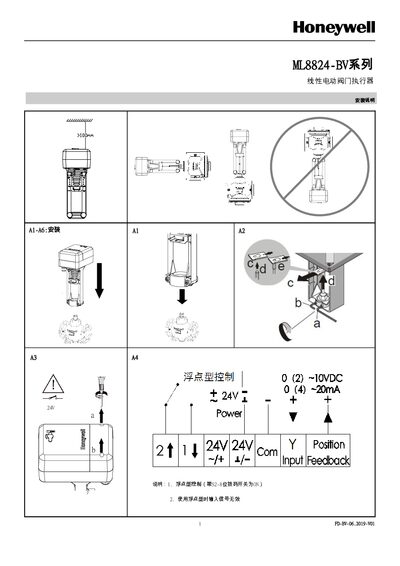
This Honeywell installation guide explains how to set up and configure the ML8824‑BV linear electric valve actuator, including dip‑switch settings…
About this manual
The guide provides step‑by‑step instructions for installing the ML8824‑BV linear electric valve actuator, covering power‑on self‑adaptation, manual adaptation, and dip‑switch configuration. It also details safety precautions and required tools.
Key features include dip‑switch functions for control mode, signal type, and speed settings, as well as NFC‑enabled parameter programming via the Honeywell app. The document explains how to set control signals, feedback types, and operating modes to match system requirements. This manual is written in Chinese.
What's inside
- Installation Overview
- Dip Switch Settings
- Self‑Adaptation Modes
- Control Signal Configuration
- Speed Settings
- NFC Functionality and Parameter Settings
- Safety and Security Notes
Specifications
| High speed | 600N - 3s/mm, 1800N - 2s/mm |
|---|
| Low speed | 600N - 4s/mm, 1800N - 3s/mm |
|---|
| Control/feedback signal range | 4~20mA or 2~10VDC |
|---|
| Maximum flow rate setting range | 30%–100% of PICV's maximum flow rate |
|---|
| Dead zone range | 1.0–10.0 |
|---|
Frequently asked questions
How do I enable floating control on the actuator?
Set dip switch S2‑8 to ON; this selects floating control mode.