
Key facts
- Manuals
- 5
- Languages
- EN · ES · DE
- Last added
- 2026-10-01
Featured Di-soric manuals
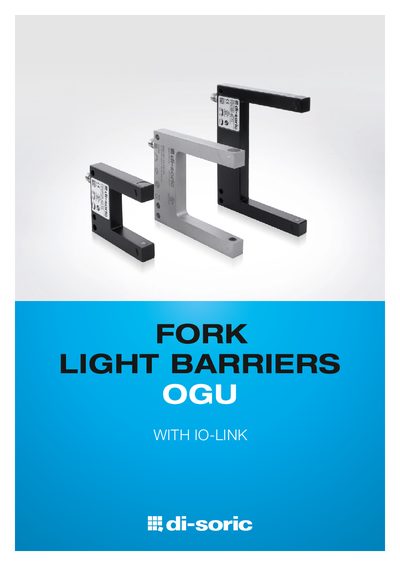
di-soric OGU Fork Light Barriers with IO-Link Technical Data Sheet
The OGU series from di‑soric are fork light barriers that use red‑light or infrared LEDs to detect objects with high speed and accuracy. They can be configured via IO‑Link, offering four selectable sensor modes – Standard, High Resolution, Power and Speed – and feature a rugged powder‑coated metal housing with IP67 protection.
Technical data include fork openings from 10 mm to 250 mm, switching frequencies up to 14 000 Hz, a smallest detectable part size of 0.2 mm, reproducibility of 0.02 mm, and a push‑pull/pnp/npn output adjustable via IO‑Link. The devices are compatible with existing OGU models and support diagnostics and parameter configuration through the IO‑Link Smart Sensor profile.
Covers: Sensor Modes · Technical Data · Resolution and Reproducibility · Switching Frequency · Housing and Protection · Interface and Output
di-soric Inclination Sensors Catalog
The di-soric catalog presents a family of inclination sensors designed for industrial automation. The sensors feature analog and digital outputs, robust stainless‑steel housings and IP67 protection, making them suitable for harsh environments and outdoor use.
The document also includes other sensor families (photoelectric, laser, distance) and a range of accessories, with technical data such as supply voltage, temperature limits and connector types for each product series. This manual is written in Spanish.
Covers: Inclination Sensors · Company Overview · International Sales Network · Photoelectric Sensors · Laser Sensors · Distance Sensors
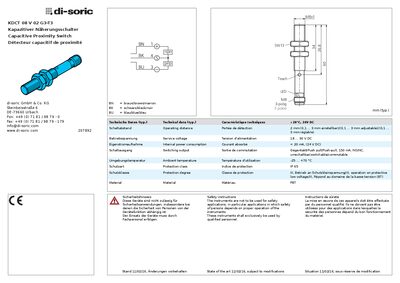
di-soric KDCT 08 V 02 G3- T3 Capacitive Proximity Switch Technical Data and User Manual
The KDCT 08 V 02 G3- T3 is a capacitive proximity switch designed for detection distances from 2 mm up to 3 mm and operation in harsh environments (IP65, protection class III). It runs on a service voltage of 18‑30 V DC and consumes less than 20 mA of internal power.
The manual provides safety information, detailed technical specifications, and step‑by‑step instructions for setting the switching point (Teach procedure) and changing the output mode between NO and NC. LED indications and mounting guidelines are also described. This manual is written in German.
Covers: Technical Data · Safety Instructions · Teach Procedure · Output Mode (NO/NC) Switching · LED Indications · Mounting and Power Connection
Latest Di-soric manuals
di-soric OGU Fork Light Barriers with IO-Link Technical Data Sheet
Product Leaflet 16 pages · 3.5 MB · ENThe di-soric OGU fork light barriers with IO-Link provide flexible, high‑precision detection across fork openings of 10‑250 mm, with four sensor modes and…
di-soric Inclination Sensors Catalog
Product Leaflet 52 pages · 9.8 MB · ESCatalog of di-soric inclination sensors with analog/digital outputs, IP67 protection and a wide supply voltage range.
di-soric KDCT 08 V 02 G3- T3 Capacitive Proximity Switch Technical Data and User Manual
User Manual 2 pages · 560 KB · DETechnical data, safety instructions, and operating guide for the di-soric KDCT 08 V 02 G3- T3 capacitive proximity switch.
DI-SORIC OGWSD 100 P3K-TSSL technology data
OGWSD 100 P3K-TSSL Photoelectric sensor is a photoelectric sensor produced by di-soric company of Germany. It has anti-collision function and can be used in industrial automation control.
Di-Soric OGU 010 G3K-TSSL technology data
Which document do I need?
User Manual
Day-to-day operation, settings and troubleshooting. Start here if the product is already set up.
Questions answered in Di-soric manuals
What is the maximum switching frequency of the OGU devices?
The Speed mode can operate at a switching frequency of up to 14 000 Hz.
From: di-soric OGU Fork Light Barriers with IO-Link Technical Data Sheet
What is the smallest part size the OGU barriers can detect?
The smallest detectable part size is 0.2 mm in the High Resolution mode.
From: di-soric OGU Fork Light Barriers with IO-Link Technical Data Sheet
What is the IP protection rating of di-soric inclination sensors?
The inclination sensors are rated IP 67, providing protection against dust and water.
What supply voltage range do the sensors require?
They operate from 10 V to 30 V DC, with some versions supporting up to 35 V.
How do I set the switching point on the KDCT proximity switch?
Press the Teach button with the tool for at least 2 seconds; the LED flashes, then release to store state 1. Press the Teach button again within 20 seconds for less than 1 second to store state 2.
From: di-soric KDCT 08 V 02 G3- T3 Capacitive Proximity Switch Technical Data and User Manual
How can I change the output mode between NO and NC?
Hold the Teach button for longer than 6 seconds; the LED flashes three times, then release to toggle the output mode.
From: di-soric KDCT 08 V 02 G3- T3 Capacitive Proximity Switch Technical Data and User Manual