
Key facts
- Manuals
- 5
- Categories
- 1
- Languages
- ZH
- Last added
- 2012-04-06
Featured swp manuals
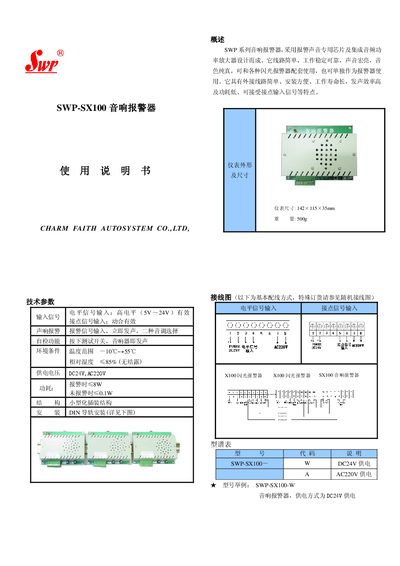
Charm Faith Autosystem SWP-SX100 Audio Alarm User Manual
The SWP‑SX100 audio alarm is designed with a dedicated alarm‑sound chip and integrated audio power amplifier, providing bright, pure‑tone alerts. It can be used together with flashing alarms or as a standalone sound alarm.
Key features include simple external wiring, DIN‑rail mounting, a wide operating temperature range, low power consumption, and two selectable alarm tones. The device accepts high‑level voltage or contact inputs and includes a self‑test button for quick verification. This manual is written in Chinese.
Covers: Overview · Technical Parameters · Input Signal · Alarm Sound · Self‑test Function · Environmental Conditions
SWP Series Digital Display Controller User Manual
This manual describes the SWP series digital display controllers, covering their main features such as LED and light‑column display, open internal parameter setting, and multi‑device network communication. It explains the supported input signals, sensor compatibility, and detailed technical parameters.
The document also provides step‑by‑step instructions for installation, wiring, parameter configuration, alarm setup, communication settings, calibration, and routine maintenance, along with troubleshooting guidance and FAQ. This manual is written in Chinese.
Covers: 主要特点 · 输入信号与适配传感器 · 主要技术参数 · 操作方式 · 控制参数(一级参数)设定 · 通讯接口与波特率
SWP SWP-C80 Dry-Type Transformer Temperature Controller User Manual
The SWP‑C80 controller is a digital, fully computer‑controlled device for monitoring and protecting dry‑type power transformers. It provides temperature display for each phase, automatic or manual fan control, alarm outputs, black‑box data retention and optional serial communication for remote monitoring.
The manual covers functional overview, calibration criteria, model variants, panel description, step‑by‑step operation, common fault handling, accessory list, ordering information, wiring diagrams and maintenance warranty details. This manual is written in Chinese.
Covers: Function Overview · Calibration Indicators · Model Classification and Function Description · Panel Description · Operation Introduction · Operation Instructions
Latest swp manuals
SWP SWP8083-EX Hot Resistance Enter Isolation Type security Fence Manual
SWP8083-EX is a thermocouple input isolated safety fence that converts the signals of two or three-wire thermocouples into two isolated standard 4~20mA/1~5V (temperature linear) current signals and transmits them to the safe side output.
SWP SWP2004 series Instrument Table Manual
SWP 2004 series instruments are AC power display control instruments that use full isolation technology to directly collect voltage and current transformer signals, calculate frequency, voltage, current, and the phase difference between them, and single-phase active power or three-phase active power.
Charm Faith Autosystem SWP-SX100 Audio Alarm User Manual
User Manual 1 pages · 98 KB · ZHThe SWP‑SX100 audio alarm from Charm Faith Autosystem is a compact, low‑power device with DC24 V or AC220 V supply, high‑volume sound, and simple wiring.
SWP Series Digital Display Controller User Manual
User Manual 18 pages · 1.1 MB · ZHThe SWP Series Digital Display Controller User Manual provides operation, wiring, parameter setting, and maintenance instructions.
SWP SWP-C80 Dry-Type Transformer Temperature Controller User Manual
User Manual 31 pages · 590 KB · ZHThis manual describes the functions, parameters, operation, troubleshooting and wiring diagrams for the SWP‑C80 dry‑type transformer temperature controller.
Which document do I need?
User Manual
Day-to-day operation, settings and troubleshooting. Start here if the product is already set up.
Questions answered in swp manuals
What power sources can the SWP‑SX100 use?
It can be powered by either DC 24 V or AC 220 V.
From: Charm Faith Autosystem SWP-SX100 Audio Alarm User Manual
How much power does the alarm draw when it sounds?
During an alarm it consumes up to 8 W, and only 0.1 W when idle.
From: Charm Faith Autosystem SWP-SX100 Audio Alarm User Manual
How do I set the first alarm value (AL1)?
Press the SET key while the PV display shows the measurement value; the instrument shows the AL1 symbol, press SET again to edit the value, adjust with the increase key, and confirm with SET.
Which communication interfaces are supported by the controller?
The controller supports standard serial two‑wire, three‑wire, or four‑wire interfaces such as RS‑485, RS‑232C, and RS‑422.
How can I switch the fan between automatic and manual control?
Press the ▲ key to force the fan on manually (the manual indicator lights); press ▲ again to return to automatic control.
From: SWP SWP-C80 Dry-Type Transformer Temperature Controller User Manual
What does the black‑box function do?
It stores all monitoring parameters before a power loss so they can be retrieved later.
From: SWP SWP-C80 Dry-Type Transformer Temperature Controller User Manual