
Key facts
- Manuals
- 5
- Categories
- 1
- Languages
- EN · ZH
- Last added
- 2026-09-30
Featured RUCKUS manuals
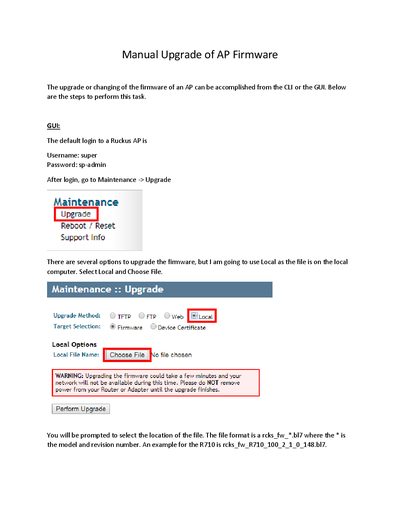
Ruckus AP Firmware Upgrade Guide
This guide explains how to manually upgrade the firmware of a Ruckus access point using either the graphical user interface or the command‑line interface. It covers login credentials, selecting the firmware file, and initiating the upgrade.
Both GUI and CLI methods are detailed, including the required file format (rcks_fw_*.bl7), TFTP server setup, and commands to verify the new firmware version after the AP reboots.
Covers: Upgrade Overview · GUI Upgrade Procedure · CLI Upgrade Procedure · Verification of Firmware · File Naming Convention
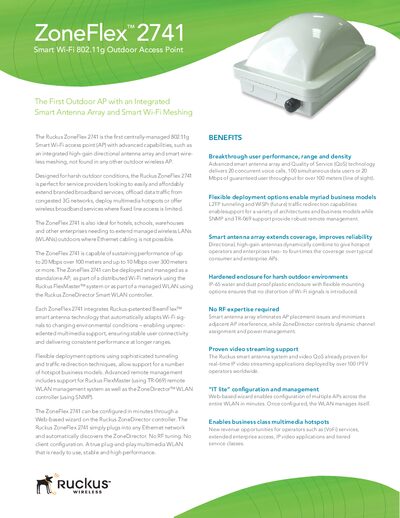
Ruckus ZoneFlex 2741 Outdoor Access Point Specification Sheet
The ZoneFlex 2741 is designed for harsh outdoor environments and can be deployed as a standalone AP or as part of a managed WLAN using Ruckus ZoneDirector or FlexMaster. It features the patented BeamFlex smart antenna technology that automatically steers Wi‑Fi signals for optimal coverage and supports up to eight SSIDs with individual QoS and security settings.
The device offers up to 20 Mbps sustained throughput over 100 m (line‑of‑sight) and up to 10 Mbps over 300 m, supports 802.11b/g standards, and includes PoE Class 0 power, an IP‑65 rated enclosure, and flexible mounting options for pole, ceiling or wall installations.
Covers: Benefits · Specifications · Deployment Configuration · Wireless Options · Antenna · Ethernet Ports
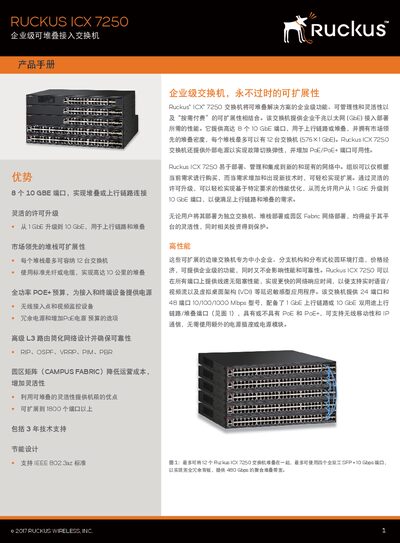
Ruckus ICX 7250 Switch Specifications
The ICX 7250 series provides flexible Ethernet access with 24 or 48 RJ‑45 ports, optional PoE/PoE+ support, and up to four 10 GbE SFP+ uplinks. It includes advanced L3 routing protocols such as RIP, OSPF, VRRP, PIM and PBR, and supports Campus Fabric for scalable deployments.
Physical specifications include a 1U rack‑mount design (440 mm × 280 mm × 437 mm for the 24‑port model), operating temperatures from –5 °C to 50 °C, and compliance with FCC, EN, and RoHS standards. Power over Ethernet budgets reach 370 W for PoE models and each PoE+ port can deliver up to 54 W.
Covers: Port Configurations · Power over Ethernet (PoE) · Routing Protocols · Physical Dimensions · Environmental Ratings · Compliance Standards
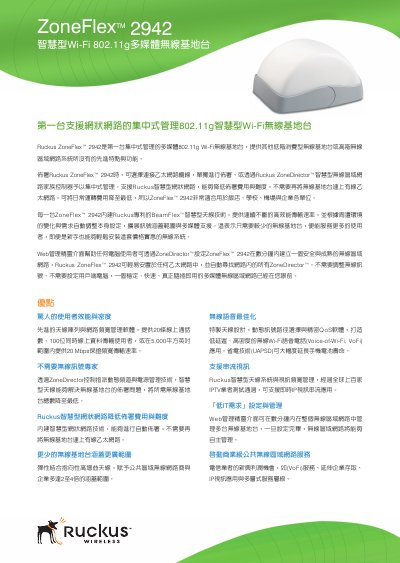
Ruckus ZoneFlex 2942 Wireless Base Station Manual
This manual describes the Ruckus ZoneFlex 2942, the first centrally‑managed 802.11g multimedia Wi‑Fi base station. It explains how to deploy the unit via Ethernet or through a ZoneDirector controller, and highlights features such as BeamFlex smart antenna technology, mesh networking, and Vo‑Wi‑Fi support.
The document includes a detailed specifications table covering power requirements, dimensions, antenna options, Ethernet ports, PoE support, and performance limits, as well as instructions for web‑based configuration, CLI, SNMP, and firmware updates. This manual is written in Chinese.
Covers: Advantages · Specifications · Physical Appearance · Power · Dimensions · Antenna
Latest RUCKUS manuals
Ruckus AP Firmware Upgrade Guide
User Manual 5 pages · 280 KB · ENStep‑by‑step instructions for upgrading Ruckus AP firmware via GUI or CLI.
Ruckus ZoneFlex 2741 Outdoor Access Point Specification Sheet
Product Leaflet 4 pages · 1.2 MB · ENThe Ruckus ZoneFlex 2741 is a centrally‑managed 802.11g outdoor access point with a high‑gain smart antenna array, IP‑65 enclosure and PoE support.
Ruckus ICX 7250 Switch Specifications
Product Leaflet 11 pages · 1.7 MB · ENThe Ruckus ICX 7250 Switch specifications detail port options, PoE budgets, routing features, dimensions and compliance information.
Ruckus ZoneFlex 2942 Wireless Base Station Manual
User Manual 2 pages · 438 KB · ZHThe Ruckus ZoneFlex 2942 Wireless Base Station manual provides setup, management, and specifications for the 802.11g multimedia Wi‑Fi device.
Ruckus ZoneSwitch 4000 Series Switch Datasheet
Datasheet 3 pages · 1.1 MB · ZHThe Ruckus ZoneSwitch 4000 series is a managed 24‑port PoE Gigabit Ethernet switch with optional SFP uplinks, supporting 802.3af/at, VLANs, QoS and advanced…
Which document do I need?
User Manual
Day-to-day operation, settings and troubleshooting. Start here if the product is already set up.
Datasheet
Ratings, dimensions and ordering codes, for selection and design work.
Questions answered in RUCKUS manuals
What are the default login credentials for a Ruckus AP?
The default username is **super** and the default password is **sp -admin**.
How can I verify that the firmware upgrade was successful?
After the AP reboots, run the **get version** command to display the current firmware version.
What is the maximum throughput over 100 meters?
The ZoneFlex 2741 can sustain up to 20 Mbps over 100 m line‑of‑sight.
From: Ruckus ZoneFlex 2741 Outdoor Access Point Specification Sheet
How many SSIDs can be configured on the access point?
Up to eight discrete SSIDs can be configured, each with its own settings.
From: Ruckus ZoneFlex 2741 Outdoor Access Point Specification Sheet
What PoE power budget does the ICX 7250‑24P provide?
The ICX 7250‑24P model provides a PoE power budget of 370 W.
Which routing protocols are supported by the ICX 7250?
Supported routing protocols include RIP, OSPF, VRRP, PIM and PBR.