
Key facts
- Manuals
- 11
- Models
- 1
- Categories
- 1
- Languages
- ZH · EN · JA
- Last added
- 2026-09-30
moxa models by category
Featured moxa manuals
Moxa MXview User Manual
The MXview User Manual explains how to install, configure, and operate the MXview network management software, which provides a web‑based graphical view of Moxa Ethernet devices, automatic topology discovery, event handling, and traffic monitoring.
The guide covers system requirements, supported devices, installation steps, migration procedures, startup, quick‑start wizard, main interface overview, device search, topology management, event notification, traffic reports, device management, VLAN/IGMP snooping, licensing, and a FAQ section. This manual is written in Chinese.
Covers: Important Features · System Requirements · Supported Devices · Installation and Migration · System Startup · Quick Start Guide
Moxa Managed Ethernet Switch User Manual (UI 2.0)
This manual provides instructions for installing and configuring Moxa managed Ethernet switches. It covers the full range of models listed on the cover and explains three ways to access the device – USB console, command‑line interface, and web‑based interface. Detailed steps for connecting the USB console, setting baud rate, and logging in are included.
The document also describes the featured functions such as VLAN, QoS, security settings, diagnostics, SNMP MIB groups, and advanced features like link aggregation and multicast filtering. Each function is illustrated with menu navigation and configuration examples, making it a complete reference for end‑users and technicians.
Covers: About this Manual · Getting Started · Featured Functions · Industrial Protocol · Diagnostics · MIB Groups
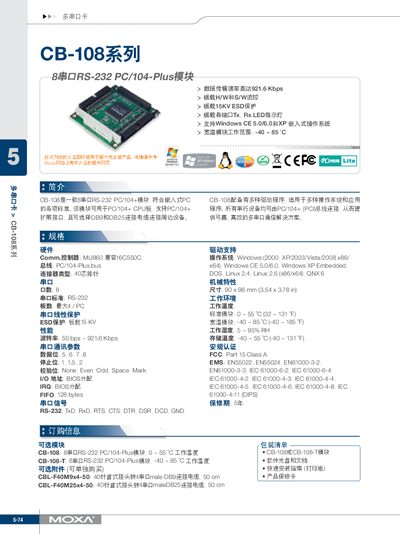
MOXA CB-108 series8 string RS-232 PC/104-Plus module Manual
The CB-108 is an 8‑port RS‑232 PC/104‑Plus module designed for industrial PC/104+ systems. It offers DB9 and DB25 connectors and supports a wide range of serial communication configurations.
The manual lists hardware features such as a 40‑pin connector, 15 kV ESD protection, and a 128‑byte FIFO. It also details supported operating systems, including Windows (2000‑2008), Windows CE, DOS, Linux, and QNX, as well as environmental specifications like a temperature range of –40 °C to 85 °C. This manual is written in Chinese.
Covers: Hardware · Performance · Operating System Support · Physical Characteristics · Regulatory Information · RS-232 Pinout
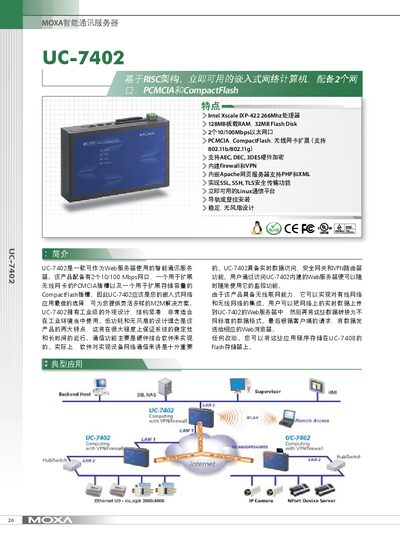
Moxa UC-7402 User Manual
The UC-7402 is an intelligent communication server with dual 10/100 Mbps Ethernet ports, PCMCIA and CompactFlash expansion, and an embedded Linux operating system. It offers hardware encryption, firewall, VPN, and web‑based management for secure networking.
This manual covers hardware specifications, power requirements, mechanical dimensions, environmental ratings, installation methods, Linux tools, networking configuration, security features, and the accessories supplied with the unit. This manual is written in Japanese.
Covers: Hardware Specifications · Power and Environmental Ratings · Mechanical Dimensions · Installation Options · Linux Operating System · Networking and Security Features
Latest moxa manuals
Moxa MXview User Manual
User Manual 72 pages · 2.5 MB · ZHThe Moxa MXview User Manual provides installation, configuration, and management instructions for the MXview network management software.
Moxa Managed Ethernet Switch User Manual (UI 2.0)
User Manual 94 pages · 2.9 MB · ENUser manual for Moxa managed Ethernet switches covering installation, configuration, VLAN, QoS, security, and diagnostics.
MOXA UC-7402 user manual
This document introduces the usage of UC-7402
MOXA CB-108 series8 string RS-232 PC/104-Plus module Manual
User Manual 1 pages · 1 MB · ZHThe Moxa CB-108 module manual provides specifications, hardware details, and installation information for the 8‑port RS‑232 PC/104‑Plus board.
Moxa UC-7402 User Manual
User Manual 2 pages · 784 KB · JAThe Moxa UC-7402 user manual provides hardware specifications, installation instructions, and configuration details for the intelligent communication server.
MOXA intelligence communication Servers Computer DA-66 Manual
MOXA intelligence communication servers computer UC-7420/UC-7410 Manual
Moxa UC-7112/UC-7110 User Manual
User Manual 2 pages · 833 KB · ZHThe manual describes the specifications, interfaces and configuration of Moxa UC-7112 and UC-7110 communication servers.
Moxa EDS-726 Series Ethernet Switch User Manual
User Manual 99 pages · ZHThe Moxa EDS-726 Series Ethernet Switch User Manual provides setup, configuration, and maintenance instructions for industrial networking.
Moxa PowerTrans Network SwitchePT-7828 user manual
User Manual 95 pages · 5.2 MB · ZHThe Moxa PT-7828 Ethernet Switch User Manual provides installation, configuration, and troubleshooting instructions for the industrial network switch.
Moxa CN2510 Async Server Quick Installation Guide
Quick Start Guide 2 pages · 448 KB · ZHThe Moxa CN2510 Async Server Quick Installation Guide provides an overview, hardware setup, power and network connections, and basic configuration steps.
Which document do I need?
User Manual
Day-to-day operation, settings and troubleshooting. Start here if the product is already set up.
Quick Start Guide
The shortest path to a working setup, usually only a few pages.
Questions answered in moxa manuals
How can MXview be migrated to another computer?
Use the Project → Export function to save the device list and topology to a file, then on the new computer use Project → Import to load the file and migrate the system.
From: Moxa MXview User Manual
Where can I view or upgrade the MXview license?
License information is available in the manual section titled "13‑1 查看授权许可" and can be upgraded from the same section.
From: Moxa MXview User Manual
What is the default IP address of a Moxa managed Ethernet switch?
The default IP address is 192.168.127.253.
Which interfaces can be used to configure a Moxa switch?
The switch can be configured via USB console, command‑line interface (CLI) over Telnet, or a web‑based browser interface.
What are the physical dimensions of the CB‑108 module?
The module measures 90 × 96 mm (3.54 × 3.78 in).
From: MOXA CB-108 series8 string RS-232 PC/104-Plus module Manual
What operating system does the UC‑7402 run?
The UC‑7402 uses an embedded Linux operating system.
From: Moxa UC-7402 User Manual