
Key facts
- Manuals
- 11
- Brands
- 1
- Languages
- EN · ZH
- Last added
- 2026-10-03
Featured Network Analyzer manuals
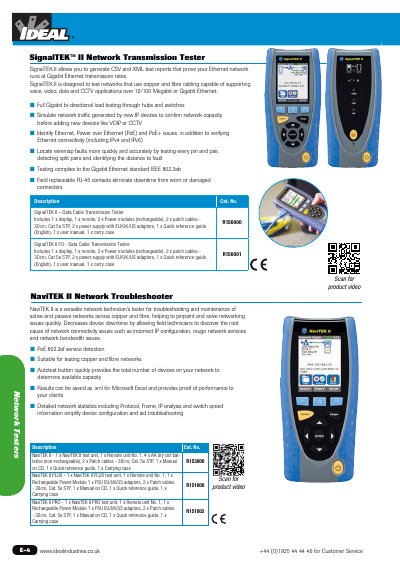
Ideal Industries NaviTEK II Network Tester Product Leaflet
The NaviTEK II family provides technicians with a compact, handheld solution for troubleshooting active and passive Ethernet networks. It supports both copper and fibre links, detects PoE 802.3af services, and can quickly autotest the total number of devices on a network.
The product line includes several variants (NaviTEK II, PLUS, PRO, SignalTEK II, SignalTEK II FO) each supplied with accessories such as remote units, rechargeable power modules, patch cables, and a carrying case. Test results can be saved as XML files for Microsoft Excel, and the SignalTEK models add full‑gigabit bi‑directional load testing and compliance with IEEE 802.3ab.
Covers: Product Overview · Key Features · Model Variants · Included Accessories · Technical Specifications
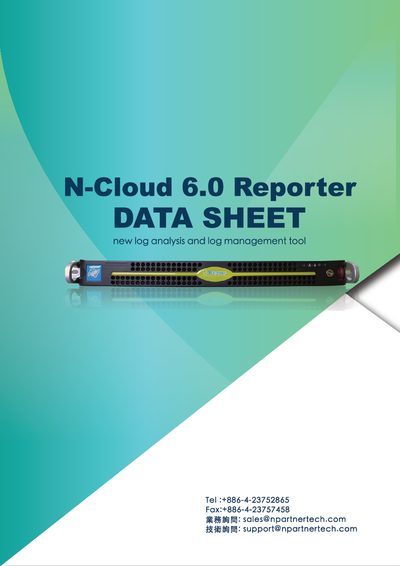
N-Partner N-Cloud 6.0 Reporter Product Leaflet
N-Cloud 6.0 Reporter integrates Syslog and Flow collection, storage, correlation and reporting for network devices, servers and security products. It provides a web‑based interface, CLI/SSH access, SNMP monitoring, IPv4/IPv6 support, customizable dashboards, and automated threat detection and blocking.
The appliance hardware includes an Intel Xeon E3‑1231 v3 CPU, 32 GB DDR3 ECC RAM, dual Gigabit Ethernet, hot‑swap SATA drives (up to four 4 TB drives), optional RAID, and a 1U rack‑mount chassis. It can ingest up to 10 000 Syslog events per second from up to 500 devices and up to 20 000 Flow records per second, delivering high‑performance, reliable network monitoring. This manual is written in Chinese.
Covers: Software Features · Flow and Syslog Correlation · Reporting and Dashboard · Hardware Specifications · Installation and Configuration · Security and Compliance
Operating the 4195A Operating Manual Publication Number 5950-2942 Published on January 1 1990 Manual
This manual describes the HP 4195A network, spectrum, impedance and S‑parameter analyzer. It explains the instrument’s front‑panel keys, softkey tree, and the general measurement sequence used for all functions.
Key sections cover function keys, preset initialization, connections and required accessories, calibration, measurement enhancements such as transmission, reflection, and spectrum analysis, as well as command listings for advanced operation.
Covers: Operating the HP 4195A · Function Keys · PRESET Initialization · Connections and Accessories · Calibration · Measurement Enhancements
Agilent 8510 Pulsed‑RF Network Analyzer User Guide
The guide introduces the Agilent 8510 Pulsed‑RF Network Analyzer, covering its system description, principles of pulsed‑RF measurements, and the types of measurements it can perform. It explains how to set up the instrument, configure pulse parameters, and use both frequency‑domain and pulse‑profile measurement modes.
Detailed sections describe calibration procedures, external triggering, high‑power measurement setups, and the various menu options (including Option 008). The document also contains warranty information, assistance contacts, and legal notices related to the transition from Hewlett‑Packard to Agilent Technologies.
Covers: Introduction · System Description · Principles of Pulsed‑RF Measurements · Pulse Measurements Overview · Operating the 8510 · Frequency Domain Point‑in‑Pulse Measurements
Latest Network Analyzer manuals
Ideal Industries NaviTEK II Network Tester Product Leaflet
Product Leaflet 1 pages · 168 KB · ENThe Ideal Industries NaviTEK II series are versatile network testers for copper and fibre, offering PoE detection, autotest, and XML report generation.
N-Partner N-Cloud 6.0 Reporter Product Leaflet
Product Leaflet 4 pages · 1.1 MB · ZHThe N-Partner N-Cloud 6.0 Reporter is an all‑in‑one appliance that collects, stores, analyzes and reports Syslog and Flow data with real‑time dashboards and…
Agilent N9923A Network Analyzer Components User
N9923A Network Analyzer Components User Guide, introduces the functions and features of the N9923A Network Analyzer Components, including RF Vector NA Mode, Forward Measurements S11, S21, Full 2-port S-parameters, Full 2-port Calibration.
Operating the 4195A Operating Manual Publication Number 5950-2942 Published on January 1 1990 Manual
User Manual 55 pages · 2.2 MB · ENThe HP 4195A Operating Manual provides step‑by‑step instructions for setup, measurement functions, and maintenance of the 4195A analyzer.
Agilent 8510 Pulsed‑RF Network Analyzer User Guide
User Manual 73 pages · 812 KB · ENThis Agilent user guide explains operation, measurement techniques, and calibration for the 8510 Pulsed‑RF Network Analyzer.
Agilent 8753A/B/C and 8702A/B Service Manual
Service Manual 485 pages · 13.9 MB · ENService manual for Agilent (formerly HP) 8753 and 8702 network and lightwave analyzers, including safety, calibration and repair procedures.
Fluke AirCheck Wi‑Fi Tester User Manual
User Manual 64 pages · 3.2 MB · ZHUser manual for the Fluke AirCheck Wi‑Fi Tester, covering operation, specifications, and safety guidelines.
Fluke Networks NetTool Series II Inline Network Tester User Manual
User Manual 160 pages · 2.1 MB · ZHThe Fluke Networks NetTool Series II Inline Network Tester User Manual provides setup, operation, and troubleshooting instructions.
HP 8755A Frequency‑Response Measuring System Product Leaflet
Product Leaflet 20 pages · 4.2 MB · ENThe HP 8755A Frequency‑Response Measuring System provides swept insertion and return loss measurements up to 18 GHz with a 60 dB dynamic range.
Juniper Route Insight 5001 Product Overview
Product Leaflet 6 pages · 1.3 MB · ZHThe Juniper Route Insight 5001 provides real‑time visibility of dynamic IP routing with detailed specs, features, and ordering information.
Fluke AirCheck‑Wi‑Fi Tester User Manual
User Manual 104 pages · 3.2 MB · ZHThe Fluke AirCheck‑Wi‑Fi Tester User Manual provides setup, operation, safety, specifications, and troubleshooting guidance for the handheld Wi‑Fi testing…
Which document do I need?
User Manual
Day-to-day operation, settings and troubleshooting. Start here if the product is already set up.
Service Manual
Disassembly, diagnostics and part numbers, for repair.
Questions answered in Network Analyzer manuals
What types of networks can the NaviTEK II test?
It can test both copper and fibre Ethernet networks, including 10/100 Mb and Gigabit Ethernet.
From: Ideal Industries NaviTEK II Network Tester Product Leaflet
Can test results be exported for analysis?
Yes, results can be saved as XML files for Microsoft Excel.
From: Ideal Industries NaviTEK II Network Tester Product Leaflet
How many devices can the system collect Syslog data from simultaneously?
The system can receive Syslog data from up to 500 devices at a rate of up to 10 000 events per second.
In which file formats can reports be exported?
Reports can be generated in HTML, PDF, XML and CSV formats.
How do I start a measurement sequence?
Press the CONFIG key to select the desired function (network, spectrum, impedance, or S‑parameter) and then follow the general measurement steps.
From: Operating the 4195A Operating Manual Publication Number 5950-2942 Published on January 1 1990 Manual
What accessory is required for impedance measurements?
Use the HP 41951A Impedance Measurement Kit with the instrument.
From: Operating the 4195A Operating Manual Publication Number 5950-2942 Published on January 1 1990 Manual