
Key facts
- Manuals
- 4
- Categories
- 1
- Languages
- ZH
- Last added
- 2026-10-03
Featured 海康威视 manuals

Hikvision DS-7800NB-K Series Network Video Recorder Operation Manual
The manual provides comprehensive guidance for using the DS-7800NB-K series network video recorder, covering basic functions, safety precautions, cloud services, local configuration, recording, playback, backup, smart detection, alarm handling, network settings, and hard‑disk management. It is intended to help users operate the device safely and efficiently.
Key sections include function overview, operation essentials, Ezviz cloud service setup, local configuration steps, recording and playback procedures, smart detection features (face, vehicle, intrusion, etc.), alarm configuration, network configuration, and hard‑disk management. The document also details web access, firmware upgrades, and user management. This manual is written in Chinese.
Covers: Function Overview · Operation Essentials · Ezviz Cloud Service · Local Configuration and Operation · Recording · Playback

Hikvision DS-3E0XXXDL Ethernet Switch User Manual
This manual explains how to safely install and operate the DS-3E0XXXDL series Ethernet switch, covering safety precautions, power‑on checks, and proper handling to avoid hazards or damage. It also describes the required power adapter, recommended installation environment, and warranty service procedures.
The guide details device connections, port types, and indicator functions, showing how to connect the switch using RJ45 ports (5‑port or 8‑port models) and how Auto MDI/MDIX allows either straight‑through or crossover cables. Packing contents, quick‑start steps, and compliance information are also included. This manual is written in Chinese.
Covers: Foreword · Overview · Symbol Conventions · Safety Precautions · Power‑On Check · Device Connection
Hikvision DS-K1T331 Series Face Recognition Terminal User Manual
This manual provides detailed guidance for the Hikvision DS‑K1T331 series face‑recognition terminal, including product overview, hardware specifications, and safety precautions. It is intended for installers, system integrators, and end users who need to configure and operate the device in access‑control environments.
The document walks through installation steps, wiring diagrams, activation methods (local, web, SADP, client software), quick setup, local device operation, and web‑based management. Appendices contain dimension drawings, full technical parameters, communication matrices, and QR‑coded command references. This manual is written in Chinese.
Covers: Overview · Product Features · Appearance Introduction · Installation Instructions · Wiring Instructions · Activation Methods
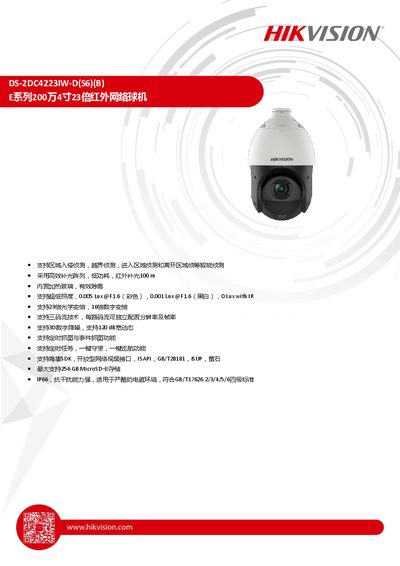
Hikvision DS-2DC4223IW-D(S6)(B) Network PTZ Camera Product Leaflet
The DS-2DC4223IW‑D(S6)(B) is a 2‑MP 4‑inch network PTZ camera offering 23× optical and 16× digital zoom, infrared illumination up to 100 m, and built‑in heating glass for anti‑fog operation. It supports a range of intelligent detection functions such as area intrusion, crossing line, and face detection, and provides multiple video streams with H.265/H.264/MJPEG compression.
Technical specifications include a 1/2.8" progressive‑scan CMOS sensor, minimum illumination of 0.005 Lux (color) and 0.001 Lux (black‑white), IP66 protection, and operation from –30 °C to 65 °C. The camera supports up to 256 GB MicroSD storage, 300 preset points, and various mounting accessories. This manual is written in Chinese.
Covers: Features · Specifications · Video · Network · Power and Environmental · Accessories
Latest 海康威视 manuals
Hikvision DS-7800NB-K Series Network Video Recorder Operation Manual
User Manual 300 pages · 13.3 MB · ZHThis operation manual explains setup, configuration, recording, playback, backup, smart detection, and maintenance for the Hikvision DS-7800NB-K series NVR.
Hikvision DS-3E0XXXDL Ethernet Switch User Manual
User Manual 2 pages · 1.6 MB · ZHThe Hikvision DS-3E0XXXDL series Ethernet switch user manual provides safety guidelines, installation steps, connection diagrams, and warranty information.
Hikvision DS-K1T331 Series Face Recognition Terminal User Manual
User Manual 172 pages · 12.7 MB · ZHUser manual for the Hikvision DS‑K1T331 series face‑recognition terminal, covering installation, wiring, activation, and operation.
Hikvision DS-2DC4223IW-D(S6)(B) Network PTZ Camera Product Leaflet
Product Leaflet 5 pages · 991 KB · ZHThe Hikvision DS-2DC4223IW-D(S6)(B) is a 2‑MP 4‑inch 23× optical zoom infrared PTZ camera with low‑light, heating glass, and extensive network features.
Which document do I need?
User Manual
Day-to-day operation, settings and troubleshooting. Start here if the product is already set up.
Questions answered in 海康威视 manuals
What is the default administrator username?
The default super‑administrator account is "admin".
From: Hikvision DS-7800NB-K Series Network Video Recorder Operation Manual
How can I reset a forgotten password?
Click “Forgot password” and choose either security‑question verification or GUID‑file verification to reset the password.
From: Hikvision DS-7800NB-K Series Network Video Recorder Operation Manual
How many ports does the DS-3E0XXXDL series switch have?
The switch is available in 5‑port and 8‑port versions.
What type of Ethernet cables can be used to connect the switch?
Both straight‑through and crossover RJ45 cables can be used because the switch supports Auto MDI/MDIX.
How many faces can be stored in the terminal?
The device can store up to 1000 face templates.
From: Hikvision DS-K1T331 Series Face Recognition Terminal User Manual
What power input does the terminal require?
It requires a DC 12 V power supply delivering 1.5 A (18 W).
From: Hikvision DS-K1T331 Series Face Recognition Terminal User Manual